
To access ePunjab School Office Login, open the official ePunjabSchool website, select Login → School/Office Login, enter your assigned username and password, type the captcha shown on your screen, and click Login.
Open Official School/Office Login
This guide explains the login steps, the difference between School/Office and Staff Login, and what to check when you cannot sign in. WayAlert is an independent guide; enter your login details only on the official government website.
ePunjab School Office Login: Official Links
| Service | Official link |
|---|---|
| School/Office Login | Open School/Office Login |
| Staff Login | Open Staff Login |
| ePunjabSchool homepage | Open official homepage |
If a direct login link does not load, try the official homepage and select the required option from the Login menu. A page failing to load does not necessarily mean your password is wrong.
How to Log In to ePunjab School Office
Keep your assigned school or office username and password ready. Use the account provided for your authorised work; do not assume that personal Staff Login credentials will work on the School/Office page.
1. Select School/Office Login
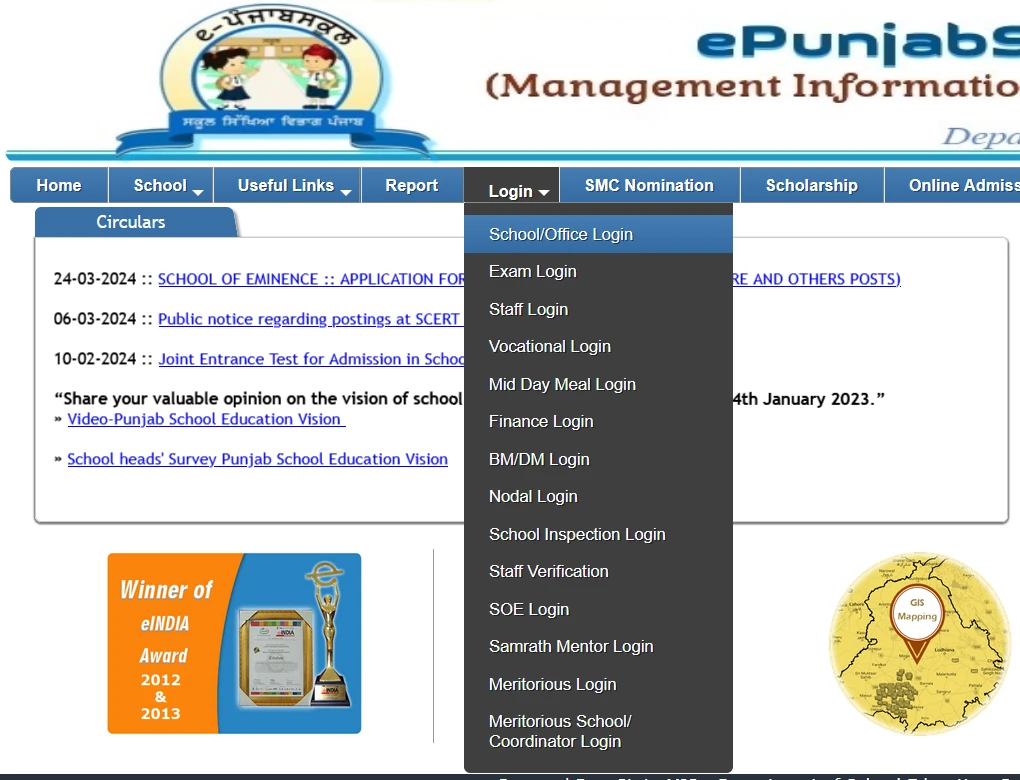
Visit the official ePunjabSchool homepage. Open the Login dropdown and choose School/Office Login. The same menu includes separate options such as Staff Login, Exam Login and Mid Day Meal Login.
2. Enter your username and password
Type your assigned username into the user name field and enter your password. Check for accidental spaces when copying either value. If your browser fills the fields automatically, confirm that it has selected the correct account.
3. Enter the current captcha and click Login
In Enter given code, type the captcha displayed below the field. If you cannot read it, use the refresh icon beside the captcha and enter the newly displayed code. Then select Login.
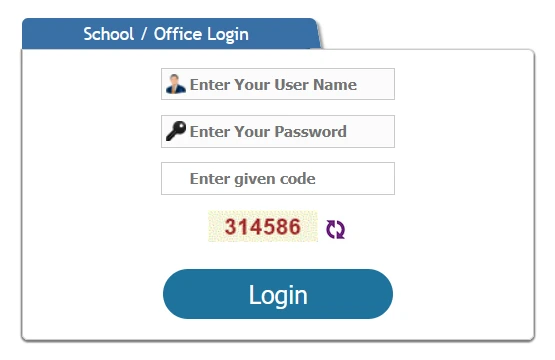
Do not copy the captcha from this screenshot. It is an example from the captured page. Use the code displayed during your own login attempt.
After successful sign-in, use the services available to your account. Available modules and permissions can vary by role. Log out when you finish, particularly on a shared school computer.
School/Office Login vs Staff Login
These are separate login options. Choose the one assigned for the task you need to complete.
| Point | School/Office Login | Staff Login |
|---|---|---|
| Account context | Authorised school or office access | Individual staff access |
| Visible fields | Username, password and captcha | Username, password and date of birth |
| Password help | No recovery link is visible in the School/Office screenshot above | The official page provides a “Forget Password ???” link |
If you are a teacher, confirm whether your task requires an individual staff account or authorised school-level access. Your job title alone does not determine which credentials to use.
How to Use ePunjabSchool Staff Login
- Open the official homepage and select Login → Staff Login.
- Enter your staff username and password.
- Enter your date of birth in the format requested by the form. The Staff Login field indicates DDMMYYYY; for example, 5 September 1985 becomes 05091985.
- Submit the login form.
Always follow the format displayed on the live page if it changes. If your recorded date of birth is incorrect, ask your school administration or designated MIS contact how to correct the record.
Forgot Your ePunjabSchool Username or Password?
For School/Office accounts
The School/Office form shown above does not display a password-recovery link. If you have forgotten the credentials, ask the authorised school administrator or designated MIS contact for the correct recovery route. Do not assume the Staff Login recovery option resets a school account.
For Staff accounts
Open the official Staff Login page and select Forget Password ???. Follow the instructions displayed there. If recovery is unavailable or your details are not accepted, contact your school administration or designated MIS support.
Never share your password or an OTP in a public comment or support screenshot. WayAlert cannot retrieve credentials, unlock accounts or change school records.
ePunjab School Office Login Not Working: What to Check
| Problem | What to try |
|---|---|
| Username or password rejected | Check the selected login type, accidental spaces, Caps Lock and browser autofill. Confirm the assigned account with your administrator. |
| Captcha rejected | Refresh the captcha and enter the current code carefully. A previously displayed code may no longer be accepted. |
| Staff date of birth rejected | Follow the format shown on the form and use the date recorded for your account. |
| Page is blank, slow or times out | Try the official homepage, check your connection and retry later. You can also test another updated browser. |
| Login form keeps reloading | Try a private browsing window. If that works, clear site-specific cookies for the portal before retrying in your normal window. |
| A service is missing after login | Confirm that you used the correct account and ask your administrator whether your role has access to that service. |
When reporting a problem, note the login page used, the time of the attempt and the exact error message. A screenshot with personal details hidden can help support identify the issue.
Other School Services and Useful Guides
The ePunjabSchool Login menu also lists services such as Exam Login, Mid Day Meal Login, Finance Login and Staff Verification. Select the service specified by your department and use the credentials authorised for it.
For separate national school-data services, see our UDISE Plus login and school code guide. UDISE Plus is a different portal; do not assume that your ePunjabSchool credentials work there.
You can also browse our Education Portals guides for related school and education services.
Frequently Asked Questions
What is the official ePunjab School Office login website?
The official School/Office login page is epunjabschool.gov.in/SchoolOfficeLogin.aspx. You can also reach it through the Login menu on the official homepage.
Is School/Office Login the same as Staff Login?
No. They are separate options with different login forms. Use the account and login route assigned for your work.
Do I need a date of birth for School/Office Login?
The School/Office form shown in this guide asks for a username, password and captcha. The separate Staff Login form asks for a date of birth.
What should I do if I do not know my login ID?
Contact your school administrator or designated MIS contact to confirm your assigned username and the correct login page. Do not guess an ID from another employee’s details.
Can I open the login page on a mobile phone?
You can try the official website in your mobile browser. If the menu or form does not fit properly, try landscape orientation or the browser’s desktop-site option. A computer may be easier for detailed data entry.
Does a login error mean my account is blocked?
Not necessarily. Incorrect credentials, a captcha mismatch, the wrong login page or a temporary loading problem can prevent access. Follow the displayed error message and contact the authorised administrator if the issue continues.