
CSE AP Gov In is the official online portal of the Department of School Education, Government of Andhra Pradesh. The website at cse.ap.gov.in provides access to departmental login services, teacher-related information, school education resources, official announcements, and links to examination and admission portals.
Users can access the CSE AP login page, find AP TET and DEECET links, check relevant RTE admission information, and track supported applications through the services provided on the official website.
This guide explains how to use the CSE AP portal, find the correct login, access important services, and resolve common login problems.
CSE AP Gov In 2026 – Quick Overview
| Particular | Details |
|---|---|
| Portal Name | CSE AP Gov In |
| Department | Department of School Education |
| State | Andhra Pradesh |
| Official Website | https://cse.ap.gov.in/ |
| Main Login | https://cse.ap.gov.in/login/ |
| Login Requirements | Authorised username, password and captcha |
| Main Services | School education information, login services and official service links |
| Related Portals | AP TET, AP DEECET, RTE, UDISE+ |
| Application Tracking | Available for supported application types |
| Intended Users | Teachers, school staff, administrators, students, parents and applicants |
Important: WayAlert.in is an independent informational website. It is not affiliated with the Andhra Pradesh Department of School Education and does not collect portal usernames, passwords or OTPs.
What Is CSE AP Gov In?
CSE AP Gov In refers to the official website of the Andhra Pradesh Department of School Education, available at cse.ap.gov.in.
The portal acts as an access point for departmental information and several services connected with school education in Andhra Pradesh.
Teachers and authorised staff may use departmental login facilities for the services assigned to their accounts. Students, parents and applicants can use publicly available links to find examination information, admission-related services, application status and educational resources.
Not every service uses the same login credentials. Some functions operate through separate official websites linked from the CSE AP homepage.
For this reason, users should identify the service they need before entering their account details.
Official CSE AP Website and Important Links
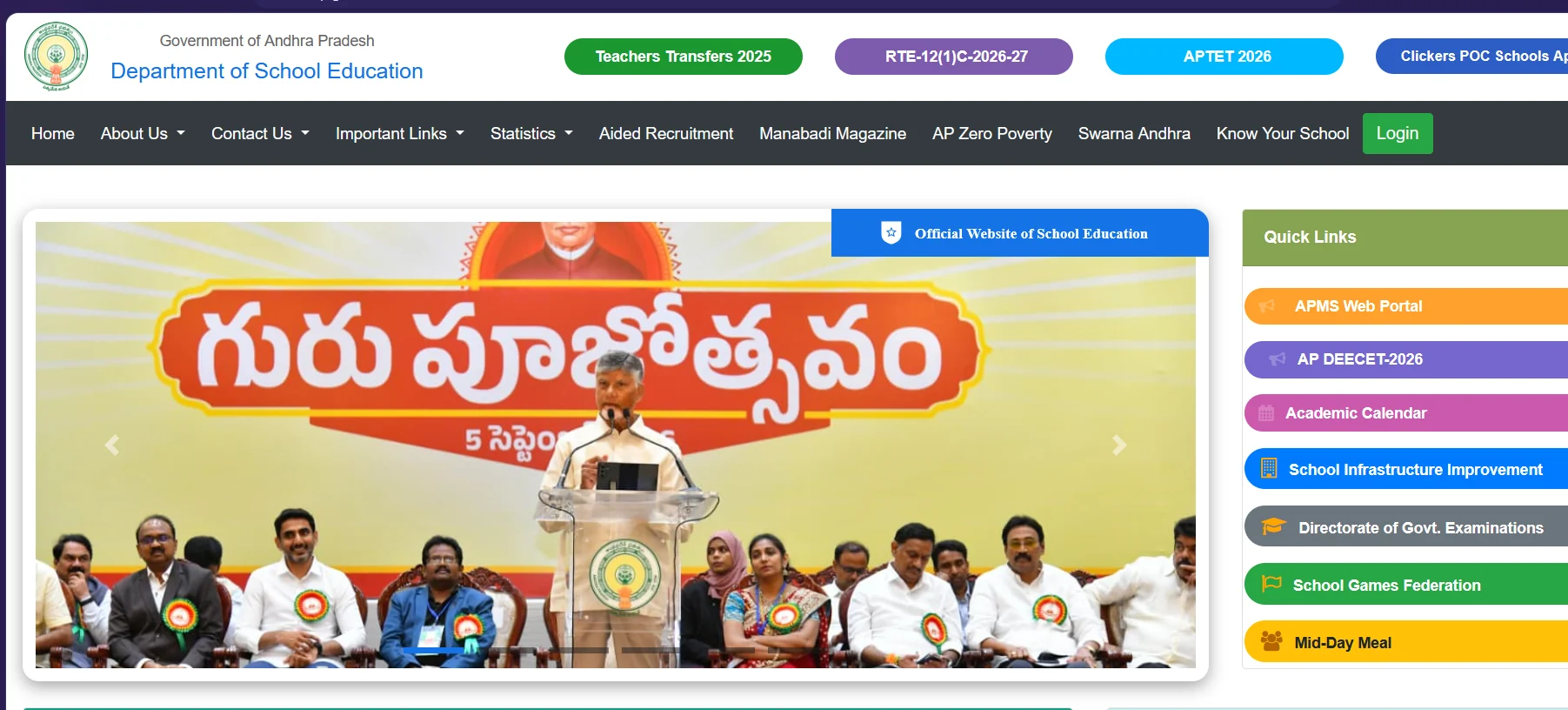
The official CSE AP homepage is:
The main login page is:
The website includes links to departmental and educational services.
| Service | Official Access |
|---|---|
| Department of School Education | CSE AP Homepage |
| CSE AP Login | Official Login |
| AP TET | AP TET Portal |
| AP DEECET | DEECET Portal |
| RTE 2026–27 Notifications | RTE Notifications |
| Application Tracking | Track Application |
| UDISE+ | UDISE+ Official Portal |
| Directorate of Government Examinations | AP Board Website |
These are related official services, but each may have different access requirements.
If a direct service link changes or becomes unavailable, return to the CSE AP homepage and follow the currently displayed link.
How to Login to CSE AP Gov In Portal
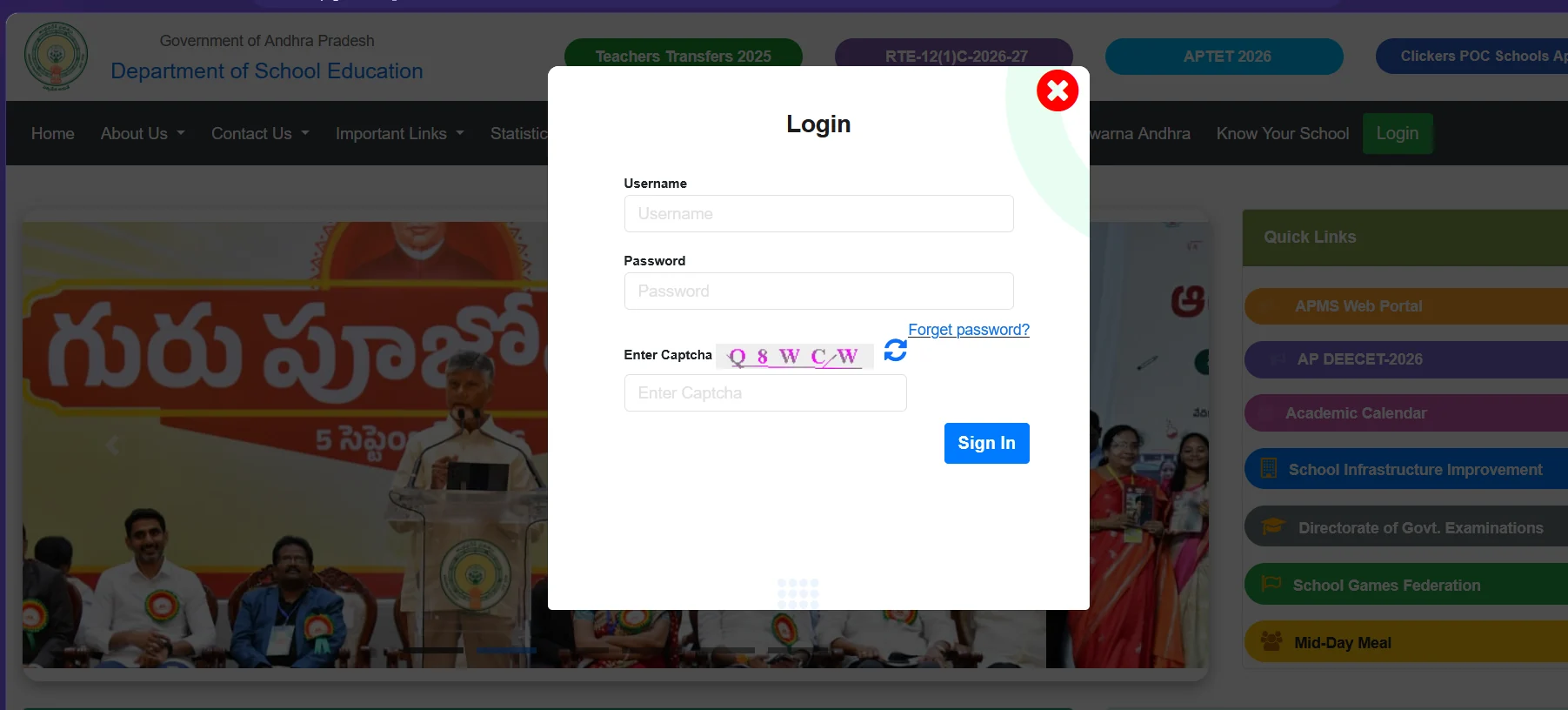
Authorised users can access the main Department of School Education login system.
Step 1: Visit the Official Website
Open a web browser and go to the official CSE AP website.
Use the official domain:
cse.ap.gov.in
Check the website address carefully before entering any credentials.
Step 2: Open the Login Page
Select the Login option displayed on the homepage.
You can also open the verified login page:
Step 3: Enter Your Username
Locate the Username field.
Enter the username assigned to your account by the relevant department or administrator.
The correct username depends on your account and the service you are authorised to access.
Do not assume that a school UDISE code, teacher treasury ID or examination application number is automatically valid for every CSE AP login.
Step 4: Enter Your Password
Type your current account password into the Password field.
Passwords should be entered exactly as required by the official system.
If your password was changed previously, use the updated password rather than an older saved password.
Step 5: Complete Captcha Verification
Enter the captcha displayed on the official login screen.
If the captcha is difficult to read or expires, follow the refresh option provided by the website, if available.
Step 6: Select Sign In
After entering your username, password and captcha, select Sign In.
If authentication succeeds, the services available to your account will depend on your assigned permissions.
If the portal rejects your credentials, check the login details before attempting password recovery.
CSE AP Teacher Login and School Services
Teachers and authorised school staff may use CSE AP and related departmental systems for assigned employee or school-management functions.
The available services can depend on the user’s role, department instructions and current portal configuration.
Teacher Information System (TIS)
The Teacher Information System is associated with maintaining teacher-related records and information.
Published departmental guidance has described TIS-related functions for personal, educational, appointment and service details.
However, the availability of individual menu options may change.
Teachers should follow the latest instructions provided by their Headmaster, school administrator or education department.
For specific username requirements, password recovery and teacher login troubleshooting, read our CSE AP Teacher Login Password Guide.
School Information and Administrative Services
The CSE AP website is connected with school-information and administrative systems.
Depending on the authorised service, school staff may need to access relevant systems for school details, student records or departmental reporting.
The exact login method and permitted actions depend on the individual system.
UDISE+ Student Data Services
The CSE AP homepage directs schools to use UDISE+ for relevant student-data entry and updating.
Schools should follow official departmental instructions for entering new student information, updating progression records and managing student transfers.
Official UDISE+ Website:
Student-data entry and school administrative work should be completed only through the authorised system.
Important CSE AP Services and Updates in 2026
The Department of School Education homepage provides links to various educational services and announcements.
AP TET 2026
The CSE AP website lists APTET 2026 among its important links.
Applicants looking for AP Teacher Eligibility Test information should follow the current official AP TET link to review available notifications, candidate services and examination information.
Official AP TET Portal:
The examination portal may require separate candidate credentials. The main CSE AP teacher login should not be assumed to work for AP TET candidate services.
Always check the official notification for applicable dates, eligibility and instructions.
AP DEECET 2026
The CSE AP homepage includes an AP DEECET-2026 quick link.
Applicants can use the official DEECET portal for information and services made available for the relevant admission or examination cycle.
Official DEECET Portal:
Application dates, hall tickets, results and other features should be confirmed directly on the current official portal.
RTE Admissions 2026–27
The CSE AP website includes information related to RTE Section 12(1)(c) admissions for the 2026–27 academic year.
Parents and guardians can check the relevant official notices for eligibility, application arrangements and admission-related updates.
Official RTE Notifications Page:
https://cse.ap.gov.in/RteNotificationsPage
The portal provides access to RTE notification documents and an application-related link.
Check the relevant notification carefully before applying. Admission requirements and application schedules are determined by the department.
Teacher Transfers
The CSE AP homepage may display links to teacher-transfer services and notifications for the applicable transfer cycle.
A link labelled Teachers Transfers 2025 has appeared on the official website.
This should be treated as a reference to that particular cycle, not confirmation of an open 2026 application window.
For new transfer schedules or instructions, consult the current official departmental notifications.
Academic Calendar and School Resources
The portal also provides access to education-related resources, including an academic calendar link, government textbooks and other school information.
Teachers, students and parents should use the relevant official links available on the homepage.
Some resources may be public, while administrative functions require authorised access.
How to Track Application Status on CSE AP
The official CSE AP website provides an application-tracking facility for supported application types.
Official Application Status Page:
https://cse.ap.gov.in/ApplicationStatusSearch
Follow these steps:
- Open the official Application Status page.
- Locate the Application Type dropdown.
- Select the appropriate available application category.
- Enter the required Application Number.
- Type the captcha shown on the page.
- Complete the search using the control provided by the portal.
- Review the available application status information.
Note: This tracking facility is intended for the application types supported by its dropdown. It should not be assumed to cover every AP TET, DSC, teacher-service or admission application.
If your application type is not listed, use the tracking method specified by the relevant official service.
CSE AP Forgot Password and Login Problems
Users may encounter password, captcha, account-permission or website-access issues.
The following checks can help identify the problem.
Forgot CSE AP Password
The main CSE AP login page includes a Forget password? option.
To start recovery:
- Open the official CSE AP login page.
- Select Forget password?
- Follow the account-verification instructions displayed by the portal.
- Provide the authorised account information requested.
- Complete the required verification steps.
- Set a new password if the portal permits the reset.
- Return to the login page after successful recovery.
If the reset process fails or the registered contact details are outdated, contact your school administrator or the authorised department.
For teacher-specific password help, see our CSE AP Teacher Password Reset and Login Help.
Incorrect Username or Password
If you receive an invalid-credentials error:
- Check whether you are using the correct departmental login.
- Confirm your assigned username.
- Check the password for typing mistakes.
- Avoid accidentally inserting spaces.
- Make sure the browser is not autofilling an old password.
- Use the official password-recovery procedure if necessary.
Do not repeatedly guess credentials.
Captcha Not Working
If the captcha is rejected:
- Enter the latest captcha displayed.
- Check whether any characters were typed incorrectly.
- Refresh the captcha if the option is provided.
- Reload the page if the form has expired.
- Try again through the official login screen.
CSE AP Website Not Opening
If the portal fails to load:
- Check your internet connection.
- Verify the official URL.
- Try an updated browser.
- Open the website in a fresh browser session.
- Retry later if the server is temporarily unavailable.
A website timeout alone does not confirm that the entire government service is down.
Login Successful but Required Service Missing
A successful login does not guarantee access to every departmental service.
Available services may depend on account permissions, departmental role or the current application window.
Contact your Headmaster, administrator or the relevant education office to confirm the correct access procedure.
How to Identify the Official CSE AP Website
Before entering personal or employee information, confirm that you are using an official website.
The main departmental address is:
Some related services are hosted on separate official domains, such as apcfss.in or udiseplus.gov.in.
Always follow the relevant official department link instead of relying on unfamiliar third-party login pages.
For safer use:
- Do not share passwords or OTPs.
- Avoid links received through suspicious messages.
- Do not upload sensitive documents to unofficial websites.
- Use official password-recovery options.
- Log out after completing departmental work.
- Keep copies of important application acknowledgements when provided.
Frequently Asked Questions
1. What is the official CSE AP Gov In website?
The official Department of School Education website is https://cse.ap.gov.in/.
2. How do I login to CSE AP?
Open the official login page, enter your authorised username and password, complete the captcha and select Sign In.
3. Can teachers use CSE AP for TIS services?
Authorised teachers may access relevant TIS-related services through the departmental systems assigned to them. The available functions depend on their account permissions and current departmental instructions.
4. What should I do if I forget my CSE AP password?
Use the Forget password? option on the main login page and follow the official recovery steps. Contact the authorised school or departmental administrator if account verification cannot be completed.
5. Is AP TET login the same as CSE AP teacher login?
Not necessarily. AP TET candidate services operate through the relevant examination portal and may require separate candidate credentials.
6. How can I check an application on CSE AP?
Use the official Application Status Search page, select a supported application type, enter the required application number and complete captcha verification.
7. Where can I find RTE admission information for 2026–27?
Visit the official CSE AP RTE Notifications page to review the available admission-related notifications and application information.
Official Sources and Contact Information
Andhra Pradesh Department of School Education
Main CSE Login
RTE Admissions
Application Tracking
Official Application Status Search
Official Department Contact
Commissioner of School Education, Vidya Bhavan, Venkatadiri Towers, Atmakur, Mangalagiri, Guntur District, Andhra Pradesh – 522503.
Phone numbers listed on the official website: 08645-297600 and 08645-297500.
Disclaimer: WayAlert.in is an independent informational website and is not affiliated with the Government of Andhra Pradesh or the Department of School Education. We do not provide official logins, change passwords or process applications. Verify important instructions and deadlines through the respective government websites.