
AP CFMS Challan Download is useful for citizens and other users who need to retrieve, view or print a challan generated through the Andhra Pradesh Comprehensive Financial Management System. The official CFMS service provides a Challan Status option where users can search using transaction details and access the available challan information.
This 2026 guide explains how to check AP CFMS Challan Status, how to retrieve APTC Form 10, which transaction details can be used, what to do if the challan is not found, and how to avoid duplicate payments.
Official AP CFMS Portal:
https://cfms.ap.gov.in/
AP CFMS Challan Download 2026 – Quick Answer
To retrieve an AP CFMS challan:
- Open the official AP CFMS Portal.
- Go to Citizen Services.
- Open Receipts.
- Select Challan Status.
- Enter one of the transaction identifiers requested by the portal.
- Search for the transaction.
- Open the available challan details.
- Use the available print or download option for the challan / APTC Form 10.
Official APCFSS guidance states that Challan Status can be searched using identifiers such as:
- CFMS Transaction ID
- Department Transaction ID
- Challan Number
Keep these references safely after making any CFMS payment.
What Is AP CFMS Challan?
An AP CFMS Challan is a government payment or receipt document generated through the Andhra Pradesh Comprehensive Financial Management System.
CFMS supports different types of receipts and challans depending on the government department and payment purpose.
Examples can include:
- Citizen Challan
- Employee Challan
- PD Challan
- Judicial Challan
- Other department-specific government receipts
The department, service code and payment details vary according to the transaction.
What Is APTC Form 10?
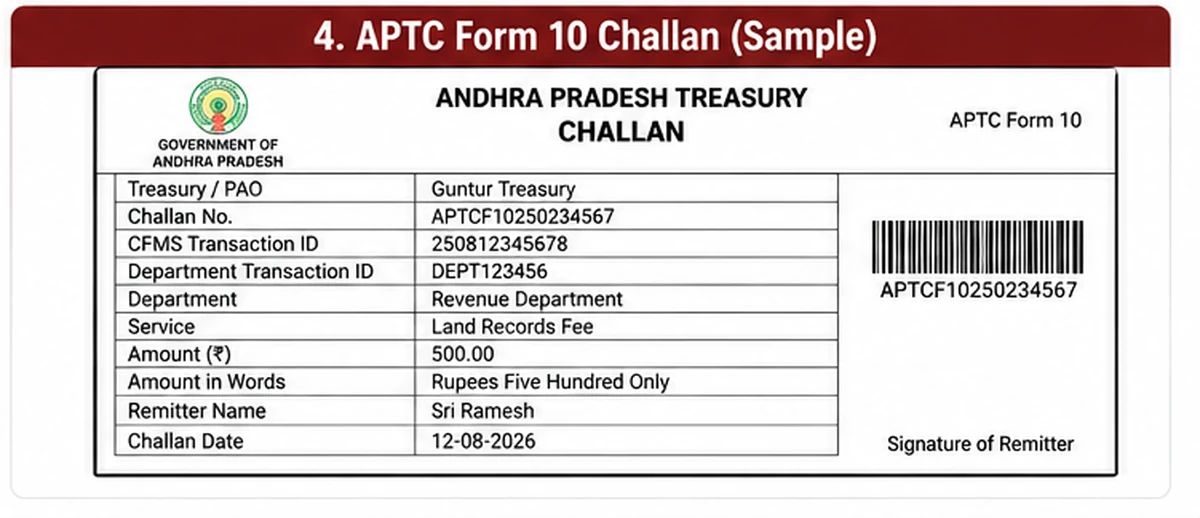
APTC Form 10 is a challan format used for remitting money into the Andhra Pradesh Government account.
The Andhra Pradesh Treasury Code identifies APTC Form 10 as the prescribed challan format for applicable government remittances.
In CFMS, users may be able to retrieve and print the challan information in APTC Form 10 format through the Challan Status service.
This is why users often search for:
- CFMS Challan Download
- APTC Form 10 Download
- CFMS Challan Print
- CFMS Challan Status
These searches are closely related to the same transaction-retrieval process.
AP CFMS Challan Download Official Website
Use the official CFMS Portal:
Before entering transaction details, confirm that the domain is ap.gov.in.
Avoid third-party websites that ask for:
- Bank login credentials
- OTP
- Aadhaar
- Card PIN
- UPI PIN
just to retrieve a CFMS challan.
How to Download AP CFMS Challan
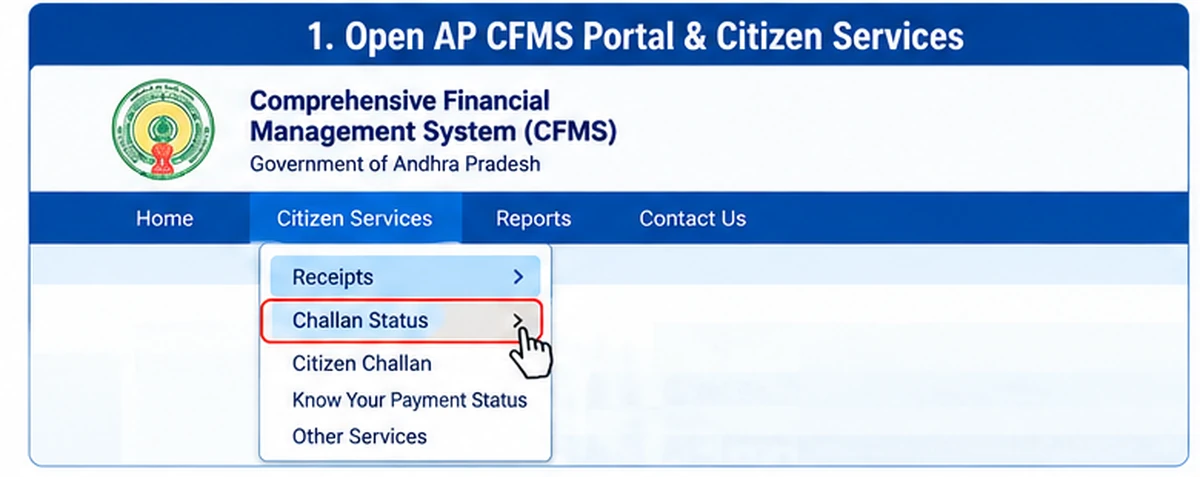
Follow these general steps.
Step 1: Open the Official CFMS Portal
Visit:
Step 2: Open Citizen Services
Look for the Citizen Services section.
Step 3: Select Receipts
Open the Receipts option.
Step 4: Select Challan Status
Choose Challan Status.
The Challan Status screen is used to retrieve existing transaction information.
Step 5: Enter Transaction Details
Enter one of the identifiers requested by the official portal.
Official APCFSS support documentation refers to options such as:
- CFMS Transaction ID
- Department Transaction ID
- Challan Number
Use the identifier available on your transaction acknowledgement or payment record.
Step 6: Search the Challan
Submit the search.
If the details match an existing transaction, the available challan information should be displayed.
Step 7: Open APTC Form 10
Where available, open the challan / APTC Form 10 view.
Step 8: Print or Save the Challan
Use the print or download option provided by the portal.
If the page provides a printable view rather than a dedicated PDF button, you may use your browser’s print function to save the document as PDF for your own records.
CFMS Challan Status by Transaction ID
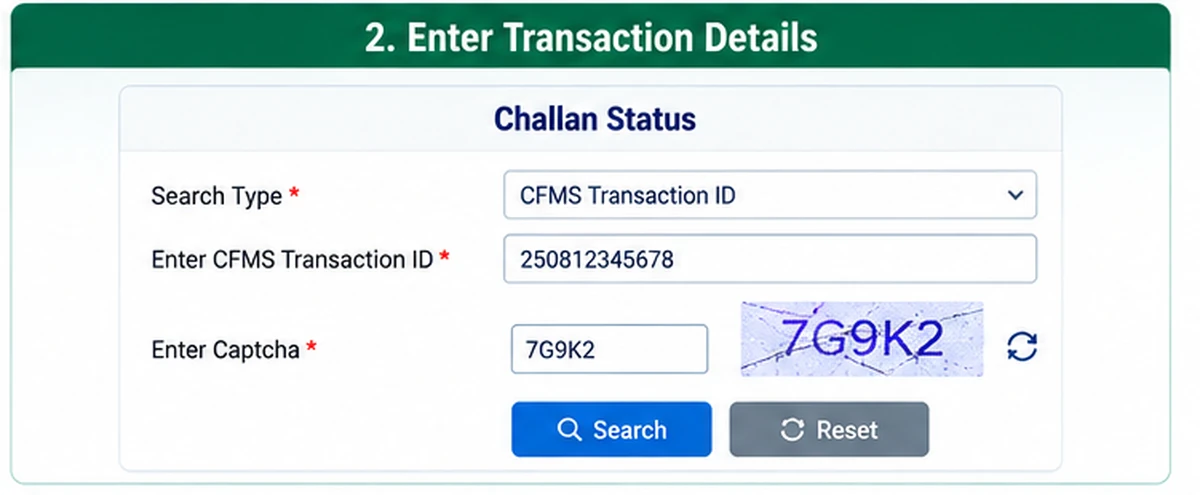
One of the easiest ways to retrieve a challan is through the CFMS Transaction ID.
This is a unique transaction reference generated as part of the CFMS payment process.
If you saved the CFMS Transaction ID:
- Open Challan Status.
- Select or enter the appropriate transaction identifier.
- Enter the CFMS Transaction ID.
- Submit the search.
- Review the transaction details.
Keep this ID until the payment and government service are fully completed.
CFMS Challan Status by Challan Number
If you have the Challan Number, it can also be used where supported by the current Challan Status screen.
Enter the challan number exactly as shown on the original acknowledgement.
Avoid:
- Adding spaces
- Removing digits
- Mixing transaction ID and challan number
- Entering a bank reference in the wrong field
If the challan is not found, confirm which identifier you are using.
CFMS Challan Status by Department Transaction ID
Some transactions can also have a Department Transaction ID.
This is different from the CFMS Transaction ID.
If your payment or department acknowledgement provides a Department Transaction ID, use that field when the Challan Status service allows it.
Do not assume that all transaction references are interchangeable.
CFMS Transaction ID vs Challan Number
These two references can relate to the same payment but are not necessarily the same number.
CFMS Transaction ID
Generated within the CFMS transaction process.
Challan Number
The challan reference associated with the government receipt.
Department Transaction ID
A reference used by the concerned department for applicable transactions.
Always enter the reference in the matching field.
AP CFMS Challan Print
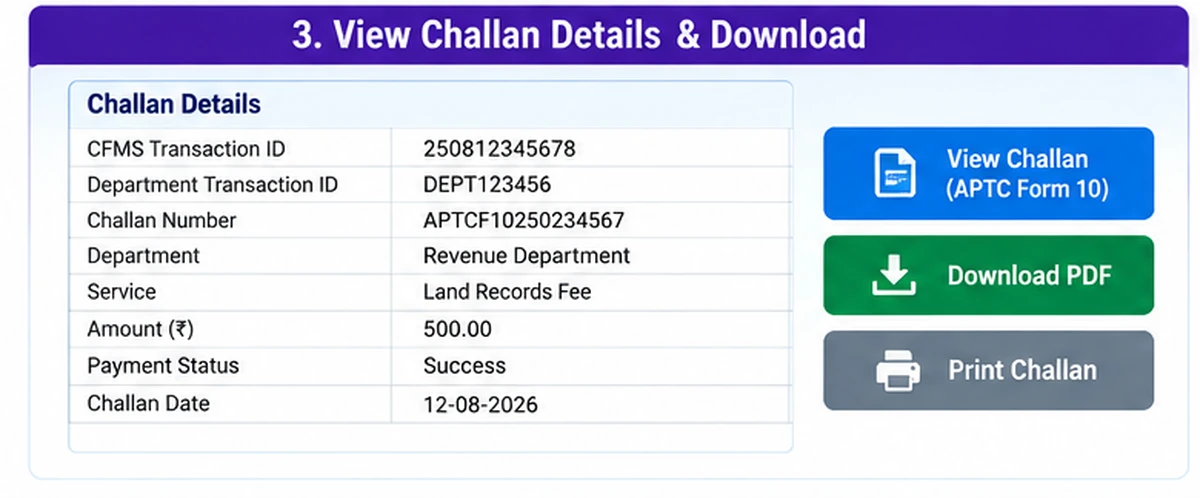
Users who need a physical copy can use the official challan view and print facility.
Before printing, verify:
- Name or remitter details
- Department
- Service
- Amount
- Transaction reference
- Payment status
- Date
If any critical information is incorrect, do not alter the printed document manually.
Contact the concerned department or official CFMS support channel.
How to Save CFMS Challan as PDF
If the official page provides a direct download button, use that option.
If only a printable challan view is available:
- Open the challan.
- Select the browser’s Print option.
- Choose Save as PDF if supported by your device.
- Save the file securely.
This does not create a new challan; it simply saves the official printable view for personal reference.
AP CFMS Challan Not Found
If the portal says that the challan cannot be found, check these points.
Wrong Transaction Reference
Confirm whether you are entering:
- CFMS Transaction ID
- Department Transaction ID
- Challan Number
in the correct field.
Typing Error
Check all digits carefully.
Transaction Is Still Processing
A very recent transaction may take time to appear.
Wrong Department or Service
If the original challan was created under an incorrect service, the transaction may not match what you expect.
Temporary Portal Issue
Try again later if the CFMS service is temporarily unavailable.
Payment Debited but Challan Not Generated
This is an important situation.
If money has been debited from your bank account but the challan is not showing:
Do not immediately make the same payment again.
First:
- Save the bank transaction reference.
- Save any CFMS transaction acknowledgement.
- Check Challan Status again.
- Wait for the transaction to update if it is still processing.
- Contact the concerned department or official CFMS support if necessary.
Duplicate payments can create additional refund or reconciliation work.
CFMS Challan Payment Pending
A pending status can mean that the transaction has not yet been fully confirmed between the payment system and CFMS.
If the payment is pending:
- Do not repeatedly submit payment.
- Keep the transaction reference.
- Check status again later.
- Confirm whether money was actually debited.
- Contact official support if the status remains unresolved.
CFMS Challan Failed but Money Debited
If the portal shows a failed transaction but your bank shows a debit:
- Save the bank reference.
- Take a screenshot for your own records.
- Do not share sensitive banking details publicly.
- Recheck CFMS Challan Status.
- Contact the concerned government department or CFMS help channel.
Do not make another payment until you understand the first transaction status.
Citizen Challan vs Employee Challan
CFMS provides different challan types for different purposes.
Citizen Challan
Used for applicable citizen/government receipt payments.
Employee Challan
Used for certain employee-related remittances.
The correct challan type depends on the purpose of the payment.
Do not select Employee Challan simply because you are a government employee if the service you need requires Citizen Challan.
Department Code and Service Code
Official CFMS support guidance states that the Department Code and Service Code are mandatory for applicable challan creation.
These codes determine where the government receipt is credited.
Never guess these values.
If you are unsure:
- Check the concerned department instructions.
- Use the options shown on the official CFMS portal.
- Contact the department before making payment.
Selecting the wrong service can make payment reconciliation difficult.
Can I Download an Old CFMS Challan?
If the transaction is still available through the current Challan Status service and you have a valid transaction reference, you may be able to retrieve the challan.
Availability can depend on the transaction and portal records.
Keep important government-payment receipts locally rather than depending indefinitely on online retrieval.
Lost CFMS Challan Number
If you lost the Challan Number but still have another accepted transaction identifier, try that reference in the Challan Status service.
For example, official guidance mentions:
- CFMS Transaction ID
- Department Transaction ID
- Challan Number
This is one reason it is useful to save all transaction references after payment.
Can I Download CFMS Challan Without Transaction ID?
Possibly, if you have another identifier accepted by the official Challan Status screen.
For example, you may be able to search using a Challan Number or Department Transaction ID.
The exact fields available can change, so follow the current portal screen.
Is AP CFMS Challan Download Free?
The act of viewing or retrieving your challan from the official CFMS portal should not require payment to a third-party website.
The underlying government service or challan itself can involve an official fee depending on the transaction.
Never pay an unofficial website merely to “unlock” a CFMS challan PDF.
AP CFMS Challan Download on Mobile
The CFMS portal can be accessed through a mobile browser where compatible.
For easier use:
- Use an updated browser.
- Keep the phone in portrait or landscape mode depending on the page.
- Allow the page to load fully.
- Use the browser Print / Save as PDF option if necessary.
For important payments, verify all details before saving or printing.
AP CFMS Challan Download Security Tips
Follow these precautions:
- Use only
cfms.ap.gov.in. - Never share bank OTP.
- Never share UPI PIN.
- Do not enter card PIN on a third-party website.
- Keep challan transaction references private.
- Do not post government payment receipts publicly.
- Avoid unofficial challan-download applications.
- Contact the department when payment status is unclear.
AP CFMS Help Desk
If the challan problem cannot be resolved through the portal, APCFSS provides an official Service Request Tracking System.
Official APCFSS SRTS:
https://srts.apcfss.in/
Use official support for transaction-specific issues.
Keep the relevant CFMS transaction reference available when seeking help.
AP CFMS Challan Download vs Challan Status
These terms are closely related.
Challan Status
Used to locate and review the transaction.
Challan Download / Print
Used after the transaction has been located to save or print the available challan record.
So, in many cases, the correct process is:
Challan Status → Find Transaction → Open Challan → Print / Save APTC Form 10
APTC Form 10 and CFMS
The Andhra Pradesh Treasury Code identifies APTC Form 10 as a prescribed challan form used for applicable payments into government accounts.
CFMS has digitised much of the challan workflow, but the APTC Form 10 terminology continues to appear in official challan guidance.
This is why someone searching for CFMS Challan Download APTC Form 10 is generally trying to retrieve the printable government challan corresponding to a CFMS transaction.
Related AP CFMS Guide
For a broader explanation of CFMS services including login, bill status, CFMS ID and employee services, see:
AP CFMS Portal:
https://wayalert.in/ap-cfms/
This challan-download guide focuses only on retrieving and printing challans, so the two pages serve different search intents.
AP CFMS Challan Download FAQs
How can I download AP CFMS Challan?
Open the official CFMS Portal, go to Citizen Services → Receipts → Challan Status, search using the available transaction identifier and open the challan for print/download.
What is APTC Form 10?
APTC Form 10 is a prescribed Andhra Pradesh Treasury challan format used for applicable payments into government accounts.
Can I search CFMS Challan using Transaction ID?
Yes. Official APCFSS guidance identifies CFMS Transaction ID as one of the identifiers used in Challan Status.
Can I search using Challan Number?
Yes, Challan Number is also listed as a supported transaction identifier in official CFMS support guidance.
What is Department Transaction ID?
It is a department-side transaction reference used for applicable payments and is separate from the CFMS Transaction ID.
Can I save CFMS Challan as PDF?
If a direct download is offered, use it. Otherwise, where a printable official challan view is available, your browser may allow you to save the page as PDF.
What should I do if money is debited but challan is not generated?
Do not immediately pay again. Save the bank and CFMS references, recheck Challan Status and contact official support if the transaction does not update.
Can I download CFMS Challan without CFMS Transaction ID?
If you have another identifier accepted by the current service, such as Challan Number or Department Transaction ID, you may be able to retrieve it.
Is CFMS Challan Download the same as Citizen Challan creation?
No. Citizen Challan creation generates a new challan, while Challan Download / Challan Status retrieves an existing transaction.
Does WayAlert download challans for users?
No. WayAlert.in is an independent informational website and does not access CFMS transactions, bank payments or government databases.
Final Words
AP CFMS Challan Download is best handled through the official CFMS Challan Status service.
Use your CFMS Transaction ID, Department Transaction ID or Challan Number to retrieve the available transaction information. Once the challan is located, use the official print/download facility to keep a copy of the challan or APTC Form 10 for your records.
If payment has been debited but the challan is missing, avoid making an immediate duplicate payment. Check the transaction status first and use the official APCFSS support system when required.