
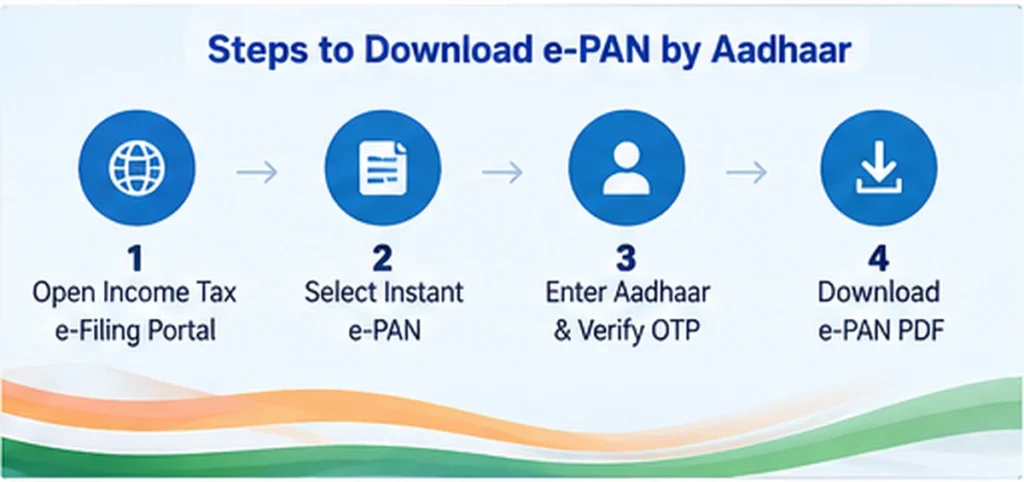
PAN Card Download can be done through different official services depending on how your PAN was issued. In 2026, users may download an eligible Instant e-PAN through the Income Tax e-Filing Portal using Aadhaar and OTP, while PAN holders whose latest application was processed through UTIITSL or Protean should normally use the respective authorised provider’s e-PAN service.
This guide explains PAN Card Download by Aadhaar Number, mobile number, PAN number, without PAN number, application details and e-PAN services, along with OTP requirements, PDF download, fees and common problems.
Official Income Tax e-Filing Portal:
https://www.incometax.gov.in/iec/foportal/
PAN Card Download 2026 – Quick Answer
There is no single download method that works for every PAN holder.
Use the method that matches your situation:
- Instant e-PAN generated through Income Tax Portal: Use Aadhaar number + Aadhaar-linked mobile OTP.
- PAN processed through UTIITSL: Use the official UTIITSL e-PAN download service.
- PAN processed through Protean: Use the official Protean e-PAN download service.
- Mobile number only: You cannot normally download an e-PAN using only a mobile number.
- Do not know PAN number: The Income Tax Portal provides PAN-related verification/Know Your PAN services, while Instant e-PAN users can check/download using Aadhaar.
- Already have PAN: Do not apply for another PAN just because your card is lost.
What Is an e-PAN?
An e-PAN is an electronic Permanent Account Number document issued in digital form.
It contains the PAN holder’s identification details and is digitally issued as an electronic PAN document.
An e-PAN can be stored on a phone, computer or secure cloud storage and used where a PAN document is accepted.
The download route depends mainly on how the PAN was issued or last processed.
PAN Card Download by Aadhaar Number
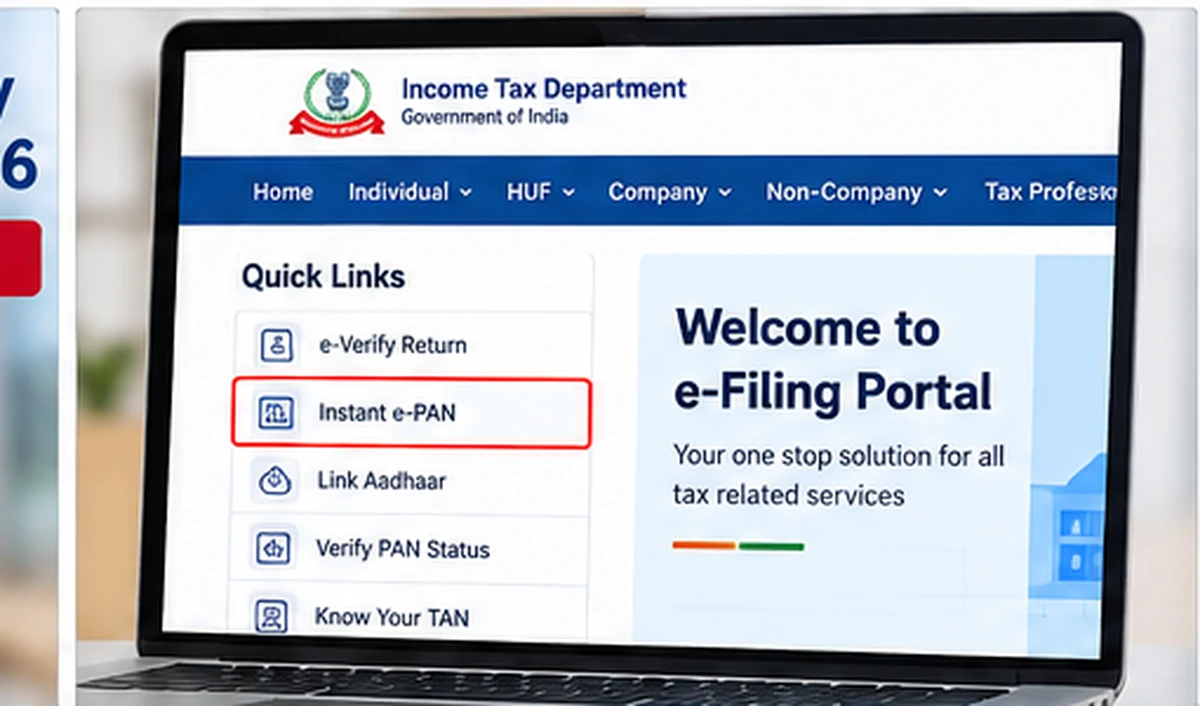
Users who obtained their PAN through the Income Tax Department’s Instant e-PAN service can check status and download the e-PAN using Aadhaar.
The official process is:
- Open the Income Tax e-Filing Portal.
- Select Instant e-PAN under Quick Links.
- Choose Check Status / Download PAN.
- Enter your 12-digit Aadhaar number.
- Continue to OTP verification.
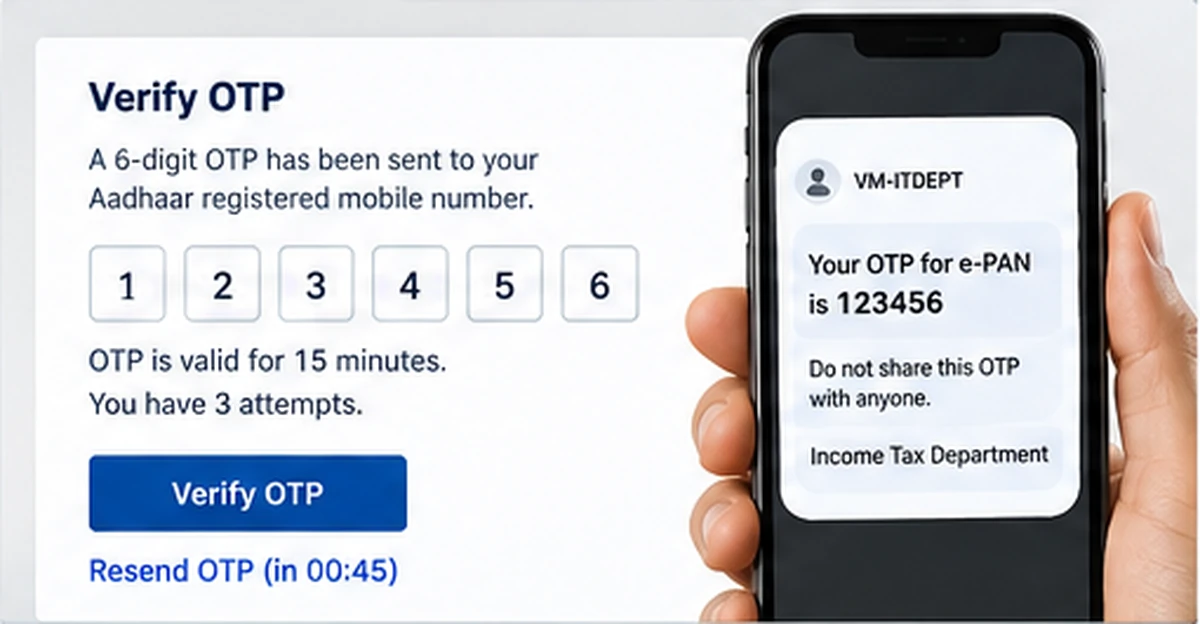
- Enter the 6-digit OTP sent to your Aadhaar-linked mobile number.
- After successful verification, view the e-PAN status.
- If the PAN has been generated, choose Download e-PAN.
You do not manually enter the PAN number in this Instant e-PAN download route.
Aadhaar OTP Rules
The current Income Tax Department process states that:
- OTP is sent to the mobile number registered with Aadhaar.
- OTP is valid for 15 minutes.
- You get up to three attempts to enter the correct OTP.
- Resend OTP can generate a fresh OTP.
Never share this OTP with another person.
PAN Card Download by Aadhaar Number Without PAN Number
For an eligible Instant e-PAN, yes.
The official Income Tax Portal’s Check Status / Download PAN facility asks for the Aadhaar number and Aadhaar-linked OTP.
This means you can retrieve an eligible Instant e-PAN without manually entering its PAN number.
However, this should not be confused with downloading every existing PAN using Aadhaar.
If your PAN was processed through UTIITSL or Protean, use the download service applicable to that PAN.
PAN Card Download by Mobile Number
One of the most searched questions is PAN Card Download by Mobile Number.
The important answer is:
A mobile number alone is not normally enough to download a PAN card from the official services.
For the Income Tax Instant e-PAN route, you need:
- Aadhaar Number
- Aadhaar-linked mobile number
- OTP
The mobile number is used for authentication, but the process begins with Aadhaar.
For PANs processed through authorised PAN providers, the provider can ask for PAN, Aadhaar, date of birth, email authentication or other details depending on its current service.
PAN Card Download by Mobile Number Without OTP
Be cautious with websites claiming to offer PAN Card Download by Mobile Number Without OTP.
Official digital PAN services use identity verification.
For example, the Income Tax Instant e-PAN download route requires Aadhaar OTP.
UTIITSL currently uses authentication linked to PAN records, including email OTP for its e-PAN request facility.
Do not enter your PAN, Aadhaar or mobile details on an unknown website simply because it promises a download without verification.
Can I Find PAN Using a Mobile Number?
The Income Tax e-Filing Portal provides PAN verification and PAN information services.
For Verify PAN Status, the current official service asks for:
- PAN
- Full name
- Date of birth
- Valid mobile number
The OTP is sent to the mobile number entered during verification.
This is useful for checking PAN details and whether the PAN is active, but it is different from directly downloading an e-PAN using only a phone number.
PAN Card Download by PAN Number
If you already know your PAN number, your download method may depend on the authorised provider that processed your PAN application or latest correction.
The two entities currently authorised for PAN-related application services include:
- UTI Infrastructure Technology and Services Limited — UTIITSL
- Protean eGov Technologies Limited
Do not use random websites simply because they allow you to type a PAN number.
UTIITSL e-PAN Download
If your PAN application or latest PAN change/correction was processed through UTIITSL, use the official UTIITSL e-PAN service.
Official UTIITSL e-PAN Download:
https://www.pan.utiitsl.com/PAN_ONLINE/ePANCardHome
The current UTIITSL service asks for information such as:
- PAN
- Month and year of birth or applicable formation date
- Captcha
The e-PAN is sent to the email address available in PAN records after the required verification.
UTIITSL e-PAN Fee
According to the current official UTIITSL service:
- The e-PAN can be provided free when the relevant e-PAN was issued within the last one month.
- After one month, the current service lists a charge of ₹8.26 inclusive of taxes per e-PAN request.
Because fees can change, always confirm the amount displayed on the official website before paying.
Protean e-PAN Download
If your latest PAN application was processed through Protean, use its official e-PAN facility.
Official Protean e-PAN Download:
https://onlineservices.proteantech.in/paam/requestAndDownloadEPAN.html
The current Protean service allows eligible PAN holders to request an e-PAN using details such as:
- PAN or acknowledgement details
- Aadhaar number for an individual
- Date of birth or applicable formation details
- Required authentication
The facility is specifically intended for PAN holders whose latest PAN application was processed through Protean.
Protean e-PAN Fee
The current Protean service states:
- For PAN allotment or confirmed changes within the previous 30 days, an e-PAN can be delivered free to the registered email up to three times.
- For older allotments or changes, the current listed e-PAN delivery charge is ₹8.26 inclusive of taxes.
Verify current charges on the official service before payment.
PAN Card Download by Name and Date of Birth Without PAN Number
Google users also search for PAN Card Download by Name and Date of Birth Without PAN Number.
There is no general official service where you simply enter a name and date of birth and immediately download a PAN PDF.
The Income Tax Portal provides PAN-related information and verification services, but direct e-PAN download requires the appropriate authentication route.
If you do not know your PAN number:
- Check the official Income Tax e-Filing Portal for PAN-related services.
- If you previously obtained an Instant e-PAN, try the Aadhaar-based Check Status / Download PAN facility.
- Check old Income Tax records or official PAN communications.
- Do not enter your name and date of birth into unknown “PAN finder” websites.
PAN Card Download Without PAN Number
There are situations where you do not need to manually type the PAN number.
The clearest example is an eligible Instant e-PAN downloaded through Aadhaar.
Use:
Instant e-PAN → Check Status / Download PAN → Aadhaar → OTP
If your existing PAN was not issued through this Instant e-PAN process, you may first need to identify your PAN or use the authorised service provider route.
PAN Card Download by Application Number
If you have recently applied for PAN or a PAN correction, keep the application acknowledgement or reference number.
Protean currently supports e-PAN requests using an acknowledgement number for eligible applications.
The exact fields and process depend on the provider that processed your application.
Do not mix an UTIITSL application reference with a Protean download page.
PAN Card Download by Phone Number
“Phone number” and “mobile number” searches usually refer to the same intent.
There is no official universal PAN Card Download by Phone Number only service.
A phone number can be used for OTP verification, but other identification details are normally required.
For Instant e-PAN, Aadhaar is the main identifier and the Aadhaar-linked mobile is used for OTP authentication.
How to Download Instant e-PAN
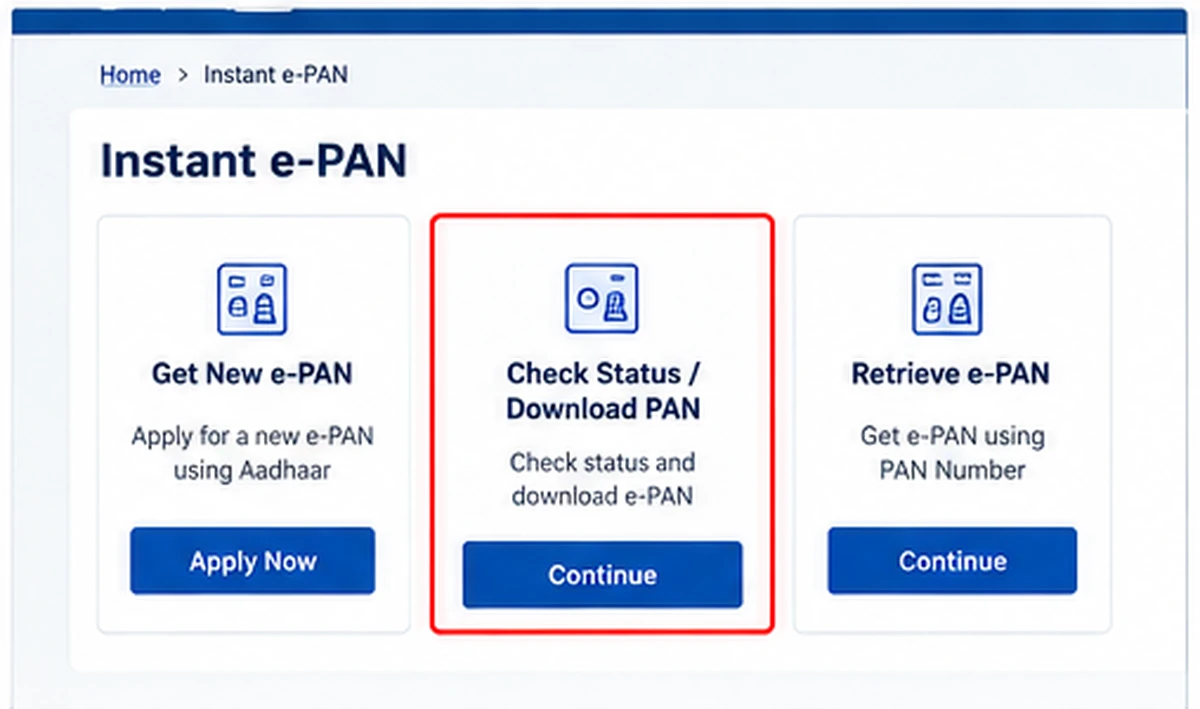
For users whose e-PAN was generated through the Income Tax Department:
- Visit the official e-Filing Portal.
- Select Instant e-PAN.
- Choose Check Status / Download PAN.
- Enter Aadhaar.
- Verify Aadhaar OTP.
- View the e-PAN status.
- Download the PDF when available.
This is one of the simplest official PAN download methods when the PAN was generated through Instant e-PAN.
What Is Instant e-PAN?
Instant e-PAN is a free service provided through the Income Tax e-Filing Portal.
It allows an eligible individual who has not already been allotted a PAN to obtain a digitally signed PAN electronically using Aadhaar-based verification.
In the current 2026 process, a person applying for a new Instant e-PAN needs:
- Valid Aadhaar
- Mobile number linked with Aadhaar
- Access to DigiLocker
A person who already has a PAN should not use this facility to obtain a second PAN.
DigiLocker Requirement for New Instant e-PAN
Current Income Tax guidance requires DigiLocker access when applying for a new Instant e-PAN.
DigiLocker is used to obtain applicable date-of-birth proof during the current application workflow.
If you do not already have a DigiLocker account, the current process can direct you to create one.
This requirement is mainly relevant to a new Instant e-PAN application.
For downloading an already generated Instant e-PAN, follow the current Aadhaar and OTP download workflow shown on the portal.
Can I Apply for Instant e-PAN if I Already Have PAN?
No.
Instant e-PAN for new PAN allotment is intended for individuals who have not already been allotted a PAN.
If your physical PAN card is lost, damaged or unavailable:
Do not apply for a new PAN number.
Instead, download the existing e-PAN where available or request a reprint using an authorised service.
PAN Card Download vs PAN Card Reprint
These are different.
e-PAN Download
You receive an electronic PAN document, normally in PDF form.
PAN Card Reprint
A physical PAN card is printed and delivered to the address available in PAN records, subject to the provider’s process and charges.
If you only need a digital PAN copy, a physical reprint may not be necessary.
PAN Card PDF Password
Some e-PAN PDF files can be password protected.
Protean’s guidance commonly uses the PAN holder’s date of birth in DDMMYYYY format as the password for an individual e-PAN PDF.
Example:
If the date of birth is 15 August 1990, the password format would be:
15081990
If a PDF does not open with the expected format, check the instructions supplied by the provider that delivered the e-PAN.
Is e-PAN Valid?
Yes.
Official PAN service information recognises e-PAN as a valid electronic form of PAN.
A physical PAN card may still be useful for convenience, but an officially issued e-PAN is not merely an unofficial copy.
Always make sure the e-PAN was downloaded or delivered through an authorised service.
How to Check PAN Status
There are different types of PAN status.
Instant e-PAN Request Status
Use:
Income Tax e-Filing Portal → Instant e-PAN → Check Status / Download PAN
Enter Aadhaar and verify OTP.
Verify PAN Status
The Income Tax Portal also provides a Verify PAN Status service.
This can help verify whether PAN details such as name and date of birth match the PAN database and whether the PAN is active.
The current pre-login verification process requires:
- PAN
- Full name
- Date of birth
- Valid mobile number
- OTP
PAN Card Download OTP Not Received
If Aadhaar OTP does not arrive:
- Check that the Aadhaar-linked mobile SIM is active.
- Confirm network signal.
- Make sure the correct Aadhaar number was entered.
- Wait before using Resend OTP.
- Do not repeatedly request OTPs unnecessarily.
For Instant e-PAN, an active Aadhaar-linked mobile number is required.
If your mobile is no longer linked with Aadhaar, update it through the appropriate Aadhaar process before retrying.
PAN Card Download Not Working
If the download does not work, check these points.
Wrong Download Portal
Make sure you are using the service that applies to your PAN.
An Instant e-PAN user and a UTIITSL/Protean PAN holder may not use the same download route.
PAN Has Not Been Generated Yet
A newly requested PAN cannot be downloaded until allotment has been completed.
Registered Email Is Outdated
UTIITSL currently sends requested e-PAN files to the email available in PAN records.
If the email is outdated, a PAN change/correction process may be required.
OTP Problem
For Aadhaar-based services, verify that the Aadhaar-linked mobile is active.
Browser Problem
Try:
- Updated Chrome
- Edge
- Firefox
- Fresh browser session
- Clearing an outdated cache
PAN Card Download Is Free or Paid?
It depends on the service.
Income Tax Instant e-PAN
The Instant e-PAN service is free.
UTIITSL / Protean
These authorised service providers may offer a free e-PAN in specified recent-issuance situations, but currently charge a small fee for older e-PAN delivery requests.
Always check the official page before making payment.
PAN Card Safety Tips
PAN and Aadhaar are sensitive identity documents.
Follow these precautions:
- Use only official Income Tax, UTIITSL or Protean services.
- Never share Aadhaar OTP.
- Never share an Income Tax account password.
- Avoid unknown PAN-download apps.
- Do not upload PAN and Aadhaar copies to random websites.
- Do not pay websites promising an “OTP-free PAN download.”
- Store your e-PAN PDF securely.
- Avoid posting PAN images publicly.
Which PAN Download Method Should I Use?
Use this simple rule:
Instant e-PAN through Income Tax:
Aadhaar + Aadhaar-linked mobile OTP.
Latest PAN application through UTIITSL:
Use UTIITSL e-PAN service.
Latest PAN application through Protean:
Use Protean e-PAN service.
Only mobile number available:
Mobile number alone is not enough for a direct official PAN download.
Do not know PAN number:
Check official Income Tax PAN-related services or use Aadhaar-based Instant e-PAN download if applicable.
Official PAN Card Download Links
Income Tax e-Filing Portal:
https://www.incometax.gov.in/iec/foportal/
UTIITSL e-PAN Download:
https://www.pan.utiitsl.com/PAN_ONLINE/ePANCardHome
Protean e-PAN Download:
https://onlineservices.proteantech.in/paam/requestAndDownloadEPAN.html
These three official services are enough for most PAN download situations.
PAN Card Download FAQs
Can I download PAN Card by Aadhaar Number?
Yes, eligible Instant e-PAN users can check and download their e-PAN using Aadhaar and Aadhaar-linked OTP through the Income Tax e-Filing Portal.
Can I download PAN Card by Mobile Number?
Not using mobile number alone. For the Instant e-PAN route, Aadhaar is required and the linked mobile number is used for OTP verification.
Can I download PAN Card by Mobile Number without OTP?
Do not trust unofficial sites promising an OTP-free PAN download. Official digital PAN services require appropriate identity verification.
Can I download PAN Card by PAN Number?
Yes, eligible PAN holders can use the official e-PAN service of the provider that processed their PAN, such as UTIITSL or Protean.
Can I download PAN without PAN Number?
Eligible Instant e-PAN users can use Aadhaar and OTP without manually entering their PAN number.
Can I download PAN Card by Name and Date of Birth?
There is no general official service that simply downloads an e-PAN PDF using only name and date of birth.
Can I get PAN using my phone number?
A phone number can be used for verification, but it is not normally the only information required to identify and download a PAN.
Is e-PAN free?
Income Tax Instant e-PAN is free. UTIITSL and Protean may charge for certain older e-PAN delivery requests.
What is the e-PAN PDF password?
For applicable Protean e-PAN PDFs for individuals, the date of birth in DDMMYYYY format is commonly used.
Can I apply for a second PAN if my card is lost?
No. If you already have a PAN, use e-PAN download or reprint services instead of applying for another PAN.
Is e-PAN valid?
Yes. An officially issued e-PAN is a valid electronic PAN document.
Is WayAlert an official PAN website?
No. WayAlert.in is an independent informational website. It does not issue PAN cards, access PAN records or receive Aadhaar OTPs.
Related PAN Guides
Separate support guides can later cover:
- PAN Aadhaar Link Status
- PAN Card Correction Online
- PAN Card Reprint
- PAN Application Status
- PAN Card PDF Password
- Instant e-PAN Apply Online
These are sufficiently different intents to support this main PAN Card Download guide without creating unnecessary duplicate download articles.
Final Words
PAN Card Download 2026 is easier when you first identify how your PAN was issued.
For an eligible Instant e-PAN, use Aadhaar and Aadhaar-linked OTP through the Income Tax e-Filing Portal. For PANs processed through UTIITSL or Protean, use the respective authorised provider’s e-PAN service.
Search terms such as PAN Card Download by Mobile Number, Aadhaar Number, PAN Number, Name and Date of Birth, or Without PAN Number do not all represent separate official download methods. Some are simply different ways users search for the same task.
Use official services, choose the route applicable to your PAN, and never share your Aadhaar OTP or PAN credentials with unofficial websites.