
AP Employee Payslip is the monthly salary statement available to eligible Andhra Pradesh Government employees through the state’s employee-service and financial-management systems. In 2026, NIDHI serves as the HRMS platform for employee services, while CFMS continues to support salary processing and employee pay-slip related financial functions.
This guide explains how to access and download the AP Employee Pay Slip PDF, how NIDHI and CFMS are connected, which login details are required, how CFMS ID is used, what to do if the latest payslip is missing, and how to resolve common login or OTP problems.
Official AP NIDHI Portal:
https://nidhi.apcfss.in/
AP Employee Payslip 2026 – Quick Answer
Andhra Pradesh Government employees can access their salary-related services through the official NIDHI/CFMS employee ecosystem.
For NIDHI mobile services, official APCFSS documentation states that employees login using:
- CFMS ID
- Password
- OTP sent to the registered mobile number
After successful login, employees can open the Employee Payslip service and download their individual payslip.
The Andhra Pradesh Treasuries and Accounts Department also confirms that employees can view employee pay slips through CFMS.
What Is AP Employee Payslip?
An AP Employee Payslip is the salary statement generated for an Andhra Pradesh Government employee for a particular pay period.
It can include information such as:
- Employee name
- CFMS ID or employee identifier
- Department
- Designation
- Pay month
- Basic pay
- Dearness Allowance
- House Rent Allowance
- Other applicable allowances
- Provident fund or other deductions
- Professional tax
- Loan deductions
- Other recoveries
- Gross earnings
- Total deductions
- Net salary
The exact fields can differ according to department, employee category and payroll rules.
AP Employee Payslip Official Services
Two related Andhra Pradesh Government systems are important for this topic:
NIDHI Portal
NIDHI is the HRMS platform used for employee-service management.
Current government information associates NIDHI with:
- Salaries
- Increments
- Transfers
- Promotions
- Leave balances
- Other employee-service functions
Official NIDHI Portal:
https://nidhi.apcfss.in/
CFMS
CFMS stands for Comprehensive Financial Management System.
The Andhra Pradesh Treasuries and Accounts Department confirms that salary processing is handled through CFMS and that employees can view employee pay slips through the system.
Official CFMS Portal:
https://cfms.ap.gov.in/
AP Employee Pay Slip Download PDF
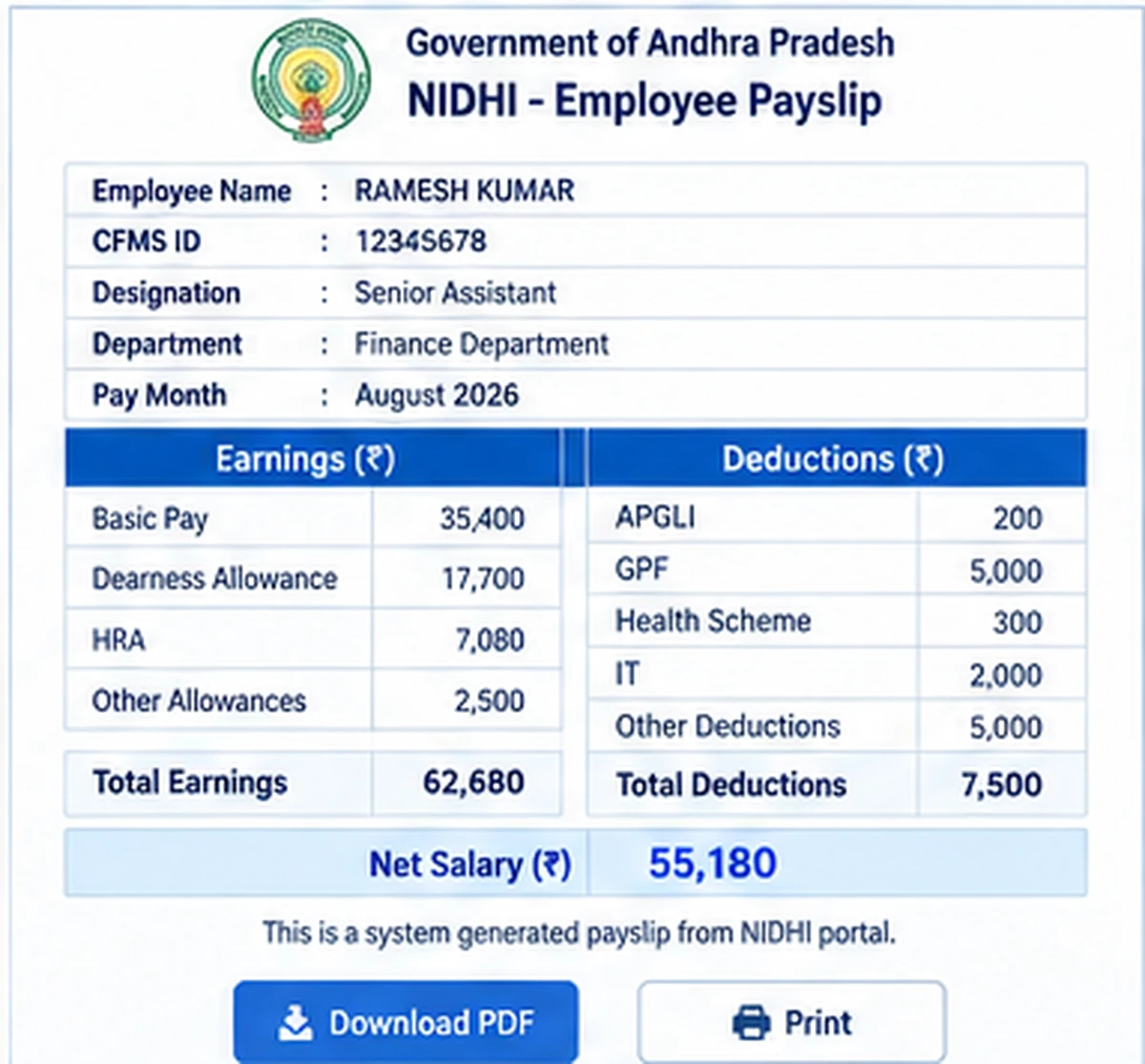
One of the most searched queries is AP Employee Pay Slip Download PDF.
Official NIDHI app documentation confirms that employees can download individual payslips.
The general process is:
- Open the official NIDHI service or approved NIDHI app.
- Login using the employee credentials required by the system.
- Complete OTP verification if requested.
- Open Employee Payslip.
- Select the required salary month or pay period where available.
- Open the payslip.
- Review earnings and deductions.
- Use the available download or save option.
The current interface may change over time, so always follow the options shown on the official service.
AP NIDHI Payslip Download
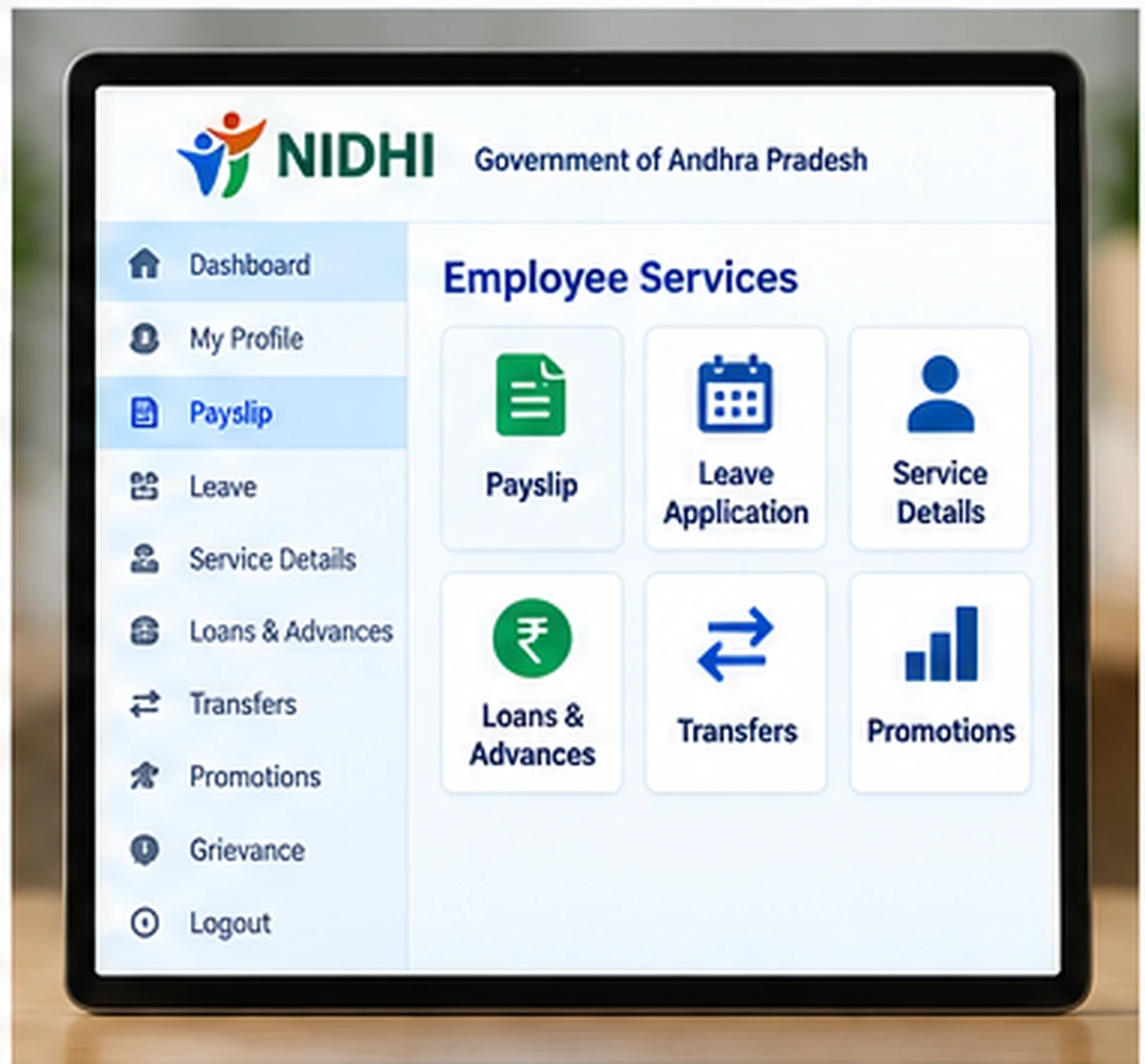
The NIDHI employee-service app specifically provides an Employee Payslip feature.
According to official APCFSS documentation, employees can download their individual payslips through this service.
For mobile access, the official flow uses:
- CFMS ID
- Password
- OTP sent to the registered mobile number
- Employee service selection
- Payslip access
Never install a NIDHI APK from an unknown website just because it claims to offer faster salary-slip downloads.
AP Employee Pay Slip CFMS
Google users frequently search for AP Employee Pay Slip CFMS.
This search is valid because CFMS remains part of Andhra Pradesh Government salary and treasury processing.
Current Andhra Pradesh Treasury information states that CFMS is used for:
- Salary processing
- Employee pay slips
- Bill tracking
- Pension pay slips
- Government financial transactions
However, employees should also be aware that NIDHI is now the main HRMS platform for many employee-service functions.
AP Employee Pay Slip CFMS Login
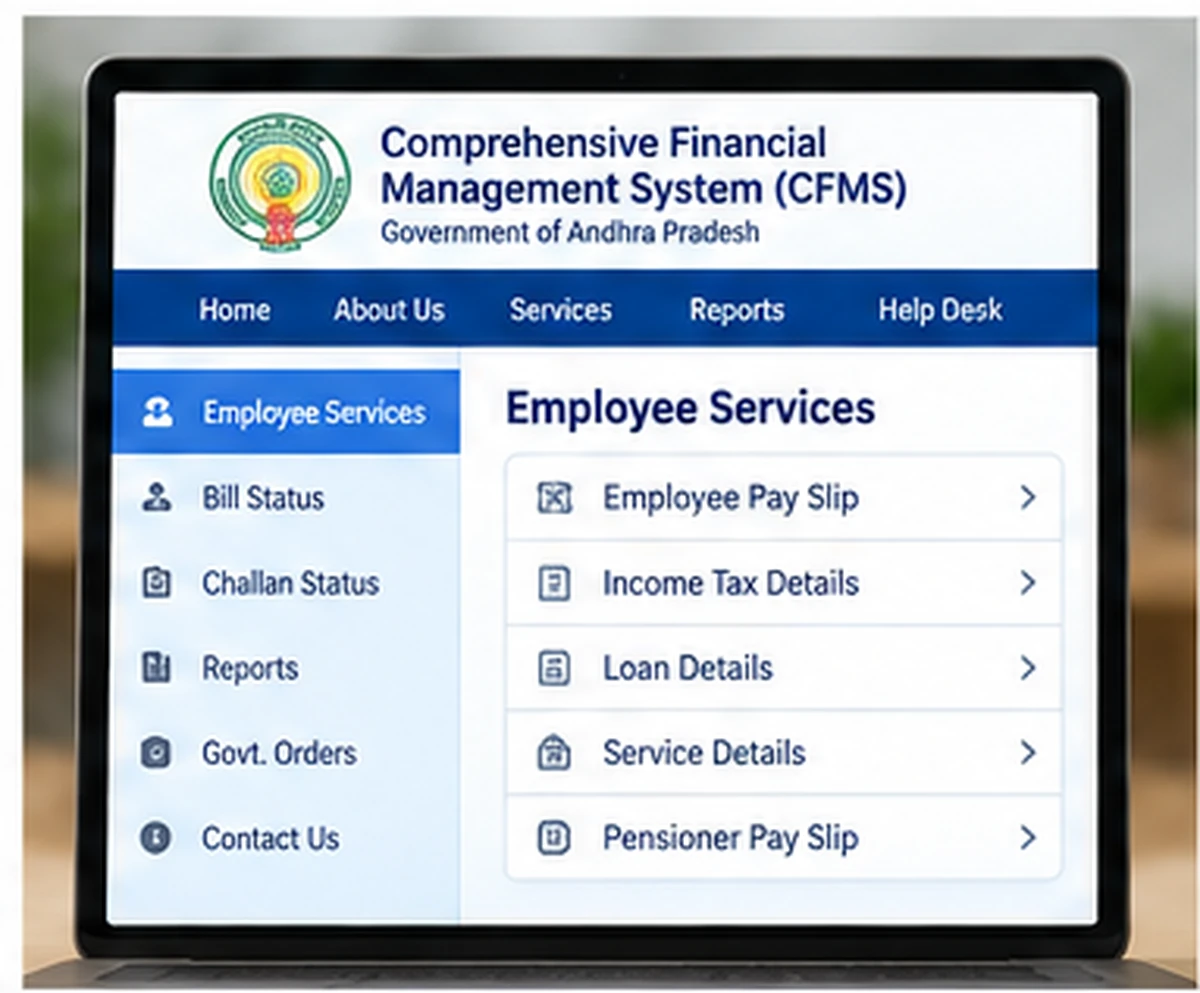
Users may also search for AP Employee Pay Slip CFMS Login.
Before entering credentials, confirm which service you actually need.
Use:
for applicable financial or treasury-related employee services.
Use:
NIDHI:
https://nidhi.apcfss.in/
for current HRMS and employee-service functions.
A login page should always belong to an official Andhra Pradesh Government or APCFSS domain.
What Is CFMS ID?
A CFMS ID is an employee identifier used across Andhra Pradesh Government financial and employee-service systems.
Official employee-service documentation refers to the CFMS ID as an 8-digit identifier.
It is commonly used for services such as:
- NIDHI login
- e-Service Book
- Employee financial services
- Payslip-related access
- Other authorised government employee applications
Do not confuse CFMS ID with a bill number or transaction ID.
How to Know Your CFMS ID
Employees who do not remember their CFMS ID should use the official Know Your CFMS ID facility available in the Andhra Pradesh employee-service ecosystem.
The current NIDHI interfaces include a Know Your CFMS ID option.
Do not submit Aadhaar, mobile number or employee details to unofficial “CFMS ID finder” websites.
AP Salary Slip Download
AP Salary Slip Download and AP Employee Payslip generally refer to the same salary-document intent.
For current Andhra Pradesh Government employee services, use the official NIDHI/CFMS system that applies to your employee profile.
Avoid third-party websites that ask you to upload service records or share OTPs just to download a salary slip.
What Details Are Shown in AP Employee Payslip?
A typical government employee payslip can include two major sections.
Earnings
Possible earnings fields can include:
- Basic Pay
- Dearness Allowance
- House Rent Allowance
- Other allowances
- Applicable special pay
Deductions
Possible deductions can include:
- GPF or applicable provident fund contribution
- APGLI
- Professional tax
- Income tax
- Loan recovery
- GIS
- Other authorised deductions
The actual salary components differ between employees.
Net Salary in AP Employee Payslip
The Net Salary is the amount remaining after applicable deductions are subtracted from gross earnings.
If the amount credited to the bank differs from what you expected, first check:
- Payroll deductions
- Loan recoveries
- Tax deductions
- Leave or attendance adjustments
- Other authorised recoveries
If the discrepancy continues, contact the DDO or payroll section.
AP Employee Payslip Not Showing
If the latest salary slip does not appear immediately, possible reasons include:
- Payroll has not yet been finalised
- Latest salary processing is still in progress
- Portal update delay
- Wrong employee profile or service selected
- Temporary server issue
- Department record problem
Wait until salary processing is completed before assuming the payslip is missing permanently.
Payslip Month Not Available
If a particular month does not appear:
- Confirm that salary was processed for that month.
- Logout and login again.
- Try the service later.
- Check whether the app or portal needs an update.
- Contact the DDO/payroll section if the payslip remains unavailable.
AP NIDHI Login Not Working
If login fails:
Check CFMS ID
Enter the employee ID exactly as recorded.
Check Password
Passwords are case-sensitive.
Use Forgot Password
If you do not remember the password, use the official recovery option.
Check OTP
OTP-based login requires access to the employee’s registered mobile number.
Try a Fresh Session
Close old tabs or app sessions and try again.
NIDHI OTP Not Received
If OTP does not arrive:
- Confirm that your registered mobile number is active.
- Check network signal.
- Wait before requesting another OTP.
- Avoid repeated resend attempts.
- Verify whether your employee profile contains the current mobile number.
If the mobile number in the employee record is outdated, contact the DDO for the official update process.
Registered Mobile Number Is Wrong
Current APCFSS documentation provides a DDO-based mobile-number updation process for employee master data.
If the old number is still linked:
- Contact the concerned DDO.
- Request correction of the registered employee mobile number.
- Complete the department verification process.
- Wait for the updated number to reflect.
- Retry NIDHI login.
Do not pay an unofficial agent to modify government employee records.
AP Employee Payslip on Mobile
Official NIDHI mobile-app resources provide employee-service access from mobile devices.
The NIDHI app includes services such as:
- Employee Payslip
- APGLI
- Loans
- Policies
- Other employee services
Use only official APCFSS application resources.
Official APCFSS App Store:
https://appstore.nidhi.apcfss.in/
AP Employee Payslip Through CFMS vs NIDHI
This is one of the most confusing parts for employees.
CFMS
CFMS is the broader financial-management system.
It is used for:
- Salary processing
- Treasury transactions
- Employee pay slips
- Bills
- Government financial processes
NIDHI
NIDHI is the HRMS / employee-service system.
It is used for:
- Salary-related employee services
- Payslips
- Increments
- Transfers
- Promotions
- Leave balances
- Other HRMS functions
So both terms can appear in searches related to AP employee payslips.
AP Employee Payslip vs Pensioner Pay Slip
These are different.
Employee Payslip
For serving government employees.
Pensioner Pay Slip
For retired employees receiving government pension.
Current Treasury information lists pension pay slips separately from employee pay slips.
If you are a pensioner, use the official pensioner service rather than an employee HRMS login.
Can I Download AP Employee Payslip Without CFMS ID?
Most authenticated employee-service access requires valid employee credentials.
If you do not know the CFMS ID, use the official Know Your CFMS ID facility instead of searching for an unauthorised bypass.
There is no safe reason to give personal employee information to a third-party website claiming that it can download salary slips without authentication.
Is AP Employee Payslip Available to the Public?
No.
Employee salary records are personal employment information.
Only authorised users should access individual salary statements through official employee services.
WayAlert cannot view or retrieve an employee’s salary slip.
AP Employee Payslip Security Tips
Keep these points in mind:
- Use official
apcfss.inorap.gov.inservices. - Never share employee password.
- Never share OTP.
- Do not share salary slips publicly.
- Avoid unofficial NIDHI or CFMS apps.
- Do not enter CFMS ID on unrelated websites.
- Logout after using a shared computer.
- Contact the DDO for account-specific problems.
AP Employee Payslip Official Links
AP NIDHI Portal:
https://nidhi.apcfss.in/
And AP CFMS Portal:
https://cfms.ap.gov.in/
Official APCFSS App Store:
https://appstore.nidhi.apcfss.in/
These official resources are sufficient for the employee payslip and login information covered in this guide.
Related AP Employee Guides
For broader employee-service help, see:
AP NIDHI Login:
https://wayalert.in/ap-nidhi-login/
AP CFMS Portal:
https://wayalert.in/ap-cfms/
Later support guides can include:
- Know Your CFMS ID
- AP e-Service Book Login
- AP NIDHI Forgot Password
- AP Pensioner Pay Slip
AP Employee Payslip FAQs
What is AP Employee Payslip?
It is the salary statement for an Andhra Pradesh Government employee showing pay, allowances, deductions and net salary details for a particular period.
Can I download AP Employee Payslip PDF online?
Yes. Official NIDHI app documentation confirms that employees can download individual payslips through the employee service.
What is required for NIDHI payslip login?
Official NIDHI mobile documentation uses CFMS ID and password followed by OTP verification.
Can I view employee pay slip through CFMS?
Yes. Current Andhra Pradesh Treasury information states that employees can view employee pay slips through CFMS.
Is AP Employee Payslip available through NIDHI?
Yes. NIDHI is the current HRMS system for employee-service management and its official app includes an Employee Payslip service.
What is CFMS ID?
CFMS ID is an employee identifier used across Andhra Pradesh Government financial and HRMS systems.
What should I do if my payslip is not showing?
Wait for salary processing to complete, retry the official service, and contact your DDO or payroll section if the payslip remains unavailable.
What should I do if NIDHI OTP is not received?
Check the registered mobile number and network status. If the employee master record contains an old number, contact the DDO for official updation.
Is CFMS the same as NIDHI?
No. CFMS focuses on broader financial and treasury functions, while NIDHI is mainly the HRMS and employee-service platform.
Is pensioner pay slip the same as employee payslip?
No. Pensioner pay slips are intended for retired employees and are handled as a separate service.
Is WayAlert an official AP employee portal?
No. WayAlert.in is an independent informational website and cannot access government employee salary records or HRMS accounts.
Final Words
AP Employee Payslip can be accessed through Andhra Pradesh’s official employee-service ecosystem.
Current government information confirms that CFMS continues to support salary processing and employee pay-slip services, while NIDHI functions as the HRMS platform for salaries and broader employee-service management.
For downloading individual payslips, the official NIDHI app provides a dedicated Employee Payslip service. Use only official NIDHI, CFMS or APCFSS resources, and never share your CFMS ID password or OTP with unknown websites.