
IFHRMS Login – Complete Guide for Employees and Pensioners (2025)
The IFHRMS Login portal, officially known as Kalanjiyam, is a government system developed by the Finance Department of Tamil Nadu. It helps employees, pensioners, and other stakeholders manage salaries, pensions, human resources, and financial operations online.
In this comprehensive guide, you’ll learn how to log in to IFHRMS as an employee or pensioner, reset your password, use the mobile app, download payslips, and troubleshoot login problems.
What is IFHRMS?
IFHRMS stands for Integrated Finance and Human Resource Management System. It was launched by the Treasuries and Accounts Department, Tamil Nadu to digitize HR and finance processes.
Through IFHRMS Login, users can:
- Access employee self-service (ESS) features
- Download monthly pay slips and pension slips
- Submit leave requests and approvals
- Manage income tax declarations
- Track bills and statements for various departments
The system improves transparency, speeds up payroll, and reduces manual errors for lakhs of employees and pensioners across Tamil Nadu.
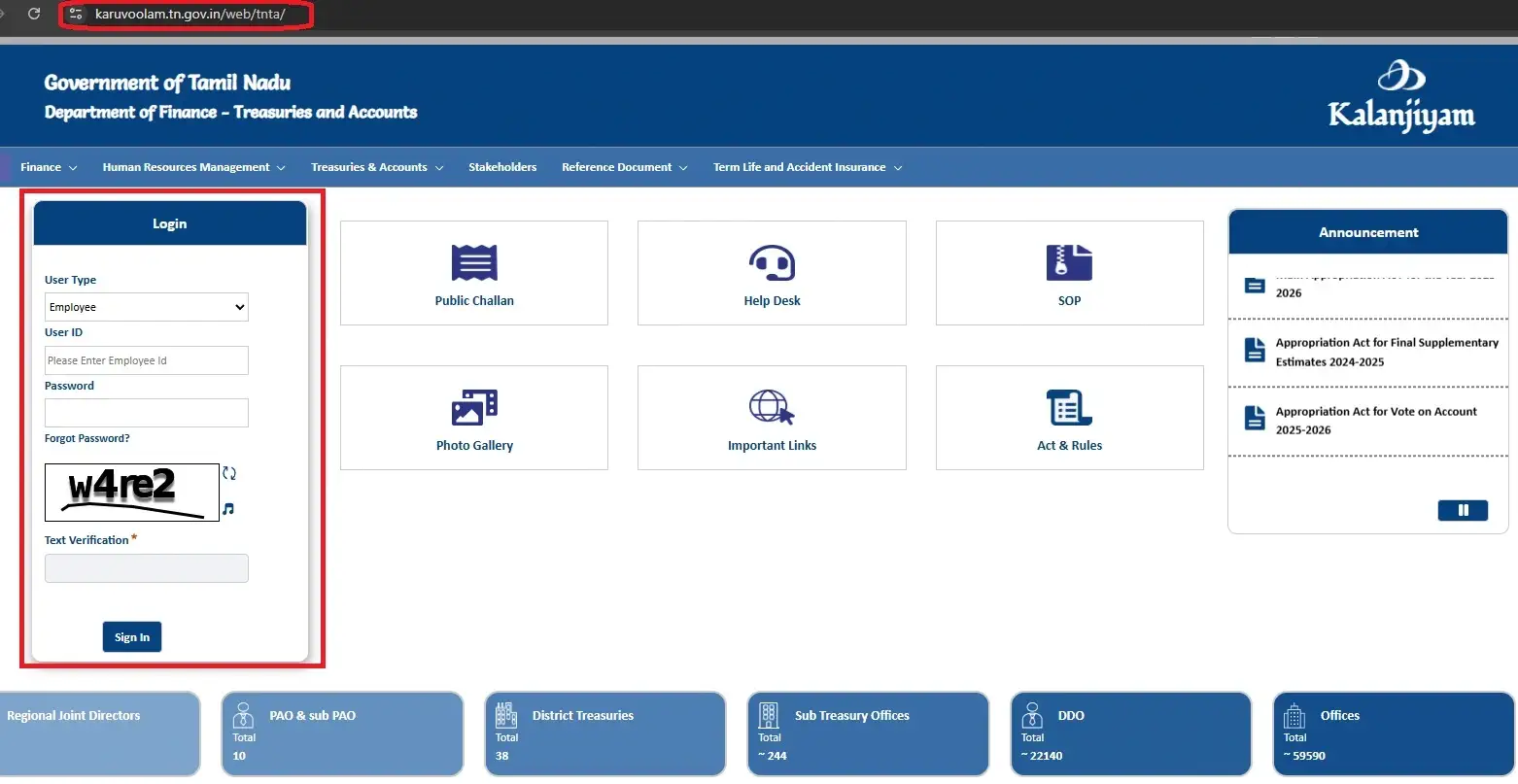
IFHRMS Login Portal and User Types
The official IFHRMS Login URL is https://www.karuvoolam.tn.gov.in/web/tnta.
When you reach the login page, you’ll see a dropdown with multiple user types, such as:
- Employee
- Pensioner
- SNA User
- Corres/Secy/Manager
- Stamp Vendor
- Accountant General (AG)
- Boards & Corporations
- External Users (Statements)
Each user type has a different dashboard and functionality.
Requirements for IFHRMS Login
Before logging in, make sure you have the following:
- User ID (Employee Code / Pensioner ID / PPO-based ID)
- Password or PIN
- CAPTCHA verification code
- (Optional) Aadhaar-linked OTP for extra security
- Stable internet connection
- Latest browser (Chrome, Firefox, Edge, or Safari)
Step-by-Step Guide to IFHRMS Employee Login at karuvoolam.tn.gov.in
- Open the official IFHRMS login portal.
- Select User Type – Employee.
- Enter your User ID and Password.
- Fill in the CAPTCHA correctly.
- Click on Sign In.
- You’ll be redirected to the Employee Self-Service (ESS) Dashboard.
From here, employees can download pay slips, submit income-tax declarations, and check service history.
Step-by-Step Guide to IFHRMS Pensioner Login
- Visit the IFHRMS login page.
- Choose User Type – Pensioner.
- Enter your Pensioner User ID (earlier PPO number; now converted to a unique ID).
- Enter your Password.
- Complete the CAPTCHA verification.
- Click Sign In to reach the Pension Dashboard.
Pensioners can use this portal to view pension details, download pension slips, and update personal information.
First-Time IFHRMS Login: Setting/Updating Password
If you are a first-time user:
- On the login page, click Update Password.
- Enter your Kalanjiyam User ID.
- If you don’t know your ID, click on Know Your Kalanjiyam ID? link.
- Set a new password and answer security questions (if asked).
- Use this password for future logins.
IFHRMS Forgot Password / Reset Password
If you forgot your password:
- Click Forgot Password on the login page.
- Enter your User ID and registered mobile number.
- Choose the OTP option (linked with Aadhaar/mobile).
- Reset your password and log in again.
IFHRMS Mobile App – Kalanjiyam (Android & iOS)
For convenience, the Tamil Nadu government provides the Kalanjiyam Mobile App:
- Android Users: Download from Google Play
- iOS Users: Available on the Apple App Store
With the mobile app, users can:
- Submit leave requests
- Check monthly/annual payrolls
- Access pension information
- View HR service requests
Always download the official app to avoid fraud.
Download IFHRMS Pay Slip / Pension Slip
Employees and pensioners can download slips online:
For Employees (Pay Slip):
- Log in as Employee.
- Go to All Reports → Pay Slip.
- Select Month & Year.
- Click Go → Download Pay Slip.
For Pensioners (Pension Slip):
- Log in as Pensioner.
- Open Reports → Pension Slip.
- Select the desired period.
- Download the PDF slip.
IFHRMS Login for DDO, SNA, AG, and Other Users
Apart from employees and pensioners, the portal also supports:
- Drawing and Disbursing Officers (DDOs) – bill preparation & approval
- Special Nodal Agencies (SNA) – fund management
- Accountant General (AG) – auditing functions
- Boards & Corporations – departmental financial operations
- External Users – to view statements
These modules are accessible through their respective login types.
Browser & Security Best Practices
- Use latest browsers like Chrome, Firefox, Edge, or Safari.
- Maintain a resolution of at least 1024×768 pixels.
- Always log out after use.
- Do not share your User ID/Password.
- Avoid using IFHRMS on public/shared computers.
Common IFHRMS Login Errors & Troubleshooting
Some common login issues include:
- Text Verification Failed → Re-enter CAPTCHA correctly.
- OTP Failed → Ensure mobile is linked with Aadhaar and has network coverage.
- Account Locked → Use “Forgot Password” to reset.
- Wrong DOB for Pensioners → Follow pension FAQ instructions for correct format.
- Slow Loading → Use updated browsers and clear cache.
If problems persist, contact the IFHRMS Help Desk.
IFHRMS FAQs (People Also Ask)
Select Employee user type, enter User ID + Password, solve CAPTCHA, and click Sign In.
Choose Pensioner, enter User ID (formerly PPO), password, and CAPTCHA.
You can find it using the “Know Your Kalanjiyam ID?” option on the password update page.
Click Forgot Password, enter User ID + mobile, verify via OTP, then set a new password.
Latest versions of Chrome, Firefox, Edge, or Safari are recommended.
Yes, both Android and iOS apps are available for IFHRMS login.
After login, go to All Reports → Pay Slip/Pension Slip, select the period, and download.
It means CAPTCHA was incorrect; refresh and re-enter carefully.
Contact the IFHRMS Help Desk at the toll-free number 1800 599 5100 or via official email.
Not mandatory; it is an optional security feature.