
Quick answer: To cancel an IRCTC e-ticket, sign in to the account that booked it. On the classic website, open Trains → Cancel E-Ticket, select the booking, choose the passengers to cancel and confirm. To check your refund later, go to My Account → My Transactions → Ticket Refund History.
How to cancel an IRCTC e-ticket online
These steps are for an e-ticket booked directly with IRCTC. If you booked through an agent or another travel site, start with that provider so it can find the booking and handle the refund. For a paper ticket bought at a railway reservation counter, use the separate Counter Ticket Cancellation option.
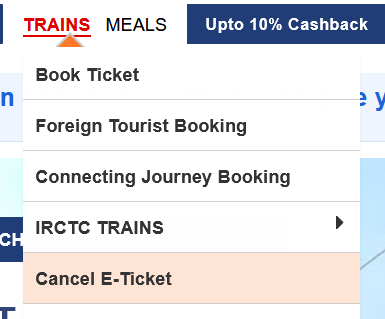
Open the official IRCTC website and sign in with the account used to book the ticket. Open Trains → Cancel E-Ticket. If you don’t see that shortcut, go to My Account → My Transactions → Booked Ticket History.
- Open the booking and check the PNR, journey date and passenger names.
- Select Cancel Ticket, then tick only the passengers who will not travel. Select everyone only if you intend to cancel the entire booking.
- Review your selection and confirm. Keep the cancellation confirmation or reference. If you cancelled only part of the booking, download the updated Electronic Reservation Slip (ERS) for the passengers still travelling.
If you can’t sign in, see our IRCTC login guide. If the booking is visible but Cancel Ticket is missing, check the ticket status and whether the chart has already been prepared.
How much will IRCTC deduct for cancellation?
For a regular confirmed ticket that you choose to cancel, the revised Indian Railways rules use the time remaining before scheduled departure. Check eligibility on your booking as soon as your plans change: normal online cancellation can close when the chart is prepared.
| Time before scheduled departure | Deduction for a regular confirmed ticket |
|---|---|
| More than 72 hours | Flat cancellation charge based on class |
| 24 to 72 hours | 25% of the fare, subject to the applicable minimum charge |
| 8 to 24 hours | 50% of the fare, subject to the applicable minimum charge |
| Less than 8 hours | No fare refund for voluntary cancellation |
RAC and waitlisted tickets follow different rules. An RAC ticket does not cancel automatically. If you’re not travelling, act promptly; the usual refund cutoff for RAC e-tickets is 30 minutes before scheduled departure. If everyone on the e-ticket is still waitlisted after charting, IRCTC generally cancels it automatically and processes the applicable refund after clerkage. And If the same PNR includes confirmed or RAC passengers, don’t assume the whole booking will cancel automatically. Check the IRCTC rules for your ticket type.
How to check IRCTC refund status
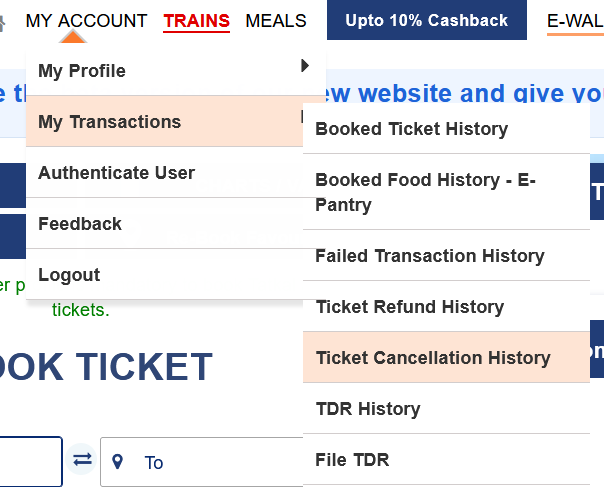
Sign in with the same IRCTC account and open My Account → My Transactions → Ticket Refund History. Open the matching booking and note the refund status, amount and any reference shown. Use Ticket Cancellation History to check whether the ticket was cancelled. A cancellation record by itself does not mean the money has reached your account.
If IRCTC shows Refunded but you can’t find the credit, check the statement or wallet used for the original payment. If a bank reference appears in the refund details, give it to your bank or payment provider so it can trace the credit. And If there is no reference, no matching refund entry, or the issue remains unresolved, raise a request through IRCTC eQuery with the PNR, transaction ID and cancellation details. Never share an OTP or payment PIN.
What if the chart is prepared and Cancel Ticket is missing?
Regular online cancellation normally stops after chart preparation. A Ticket Deposit Receipt (TDR) is a refund claim for specific eligible situations. It does not guarantee a refund. If IRCTC offers File TDR for your booking, choose the reason that applies and check its deadline immediately. Use TDR History to track a claim you filed. If the option is missing for an eligible case, use the official IRCTC support page promptly.
For example, the IRCTC refund rules list a train running more than three hours late at your boarding station, when you choose not to travel. Where IRCTC requires a TDR for this reason, file it before the train actually departs. If the Railways cancels the train for the entire journey, the eligible e-ticket refund is normally automatic.
Frequently asked questions
Can I cancel just one passenger on the same PNR?
Yes. If the e-ticket is still eligible for cancellation, select only that passenger and check the names before confirming. Save the updated reservation slip for everyone who will still travel.
Can I get a refund if I cancel a confirmed Tatkal ticket?
Ordinary voluntary cancellation of a confirmed Tatkal ticket does not qualify for a fare refund. A train disruption or a waitlisted Tatkal ticket can be handled under different rules. See the official Tatkal FAQ.
Do I need to cancel if Indian Railways cancels the train?
If the train is fully cancelled by Indian Railways, an eligible IRCTC e-ticket normally receives an automatic refund. Check Ticket Refund History. A diversion or partial cancellation can have a different process.
What if I was charged but never received a PNR?
Check Booked Ticket History first to confirm there is no issued ticket. If no booking exists, look in Failed Transaction History. Use the transaction ID to follow up; there is no ticket to cancel if IRCTC never issued one.
When will an IRCTC refund reach my bank account?
The timing can vary by payment method or provider. A TDR claim can also take longer because it has to be reviewed. If Ticket Refund History shows that a refund was issued, check the original payment statement and trace it using the reference shown, if available.