

Quick answer: Open the official IRCTC Reservation Chart. Select your train, journey date and boarding station, then click Get Train Chart. Choose your travel class and check the From Station and To Station columns to see which part of the route a berth is vacant for.
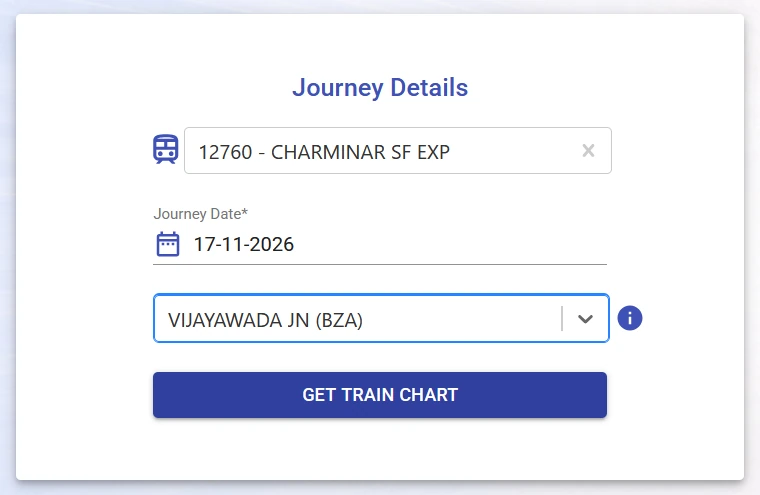
How to check the IRCTC Reservation Chart online
You can open the chart directly or choose Charts / Vacancy on the IRCTC home page. The chart search uses train and journey details. You don’t need to enter your PNR.
- Enter the train name or number and choose the matching train.
- Select your journey date and the station where you intend to board.
- Click Get Train Chart. Check the train number, journey date and boarding station in the results before reading the vacancies.
How to read the vacant berth details
Select the travel class you want to check. In this example, the class buttons include First AC (1A), Second AC (2A), Third AC (3A) and Sleeper (SL). The page also shows the first chart creation time and, when the second chart is available, the timestamp for its vacancy results.

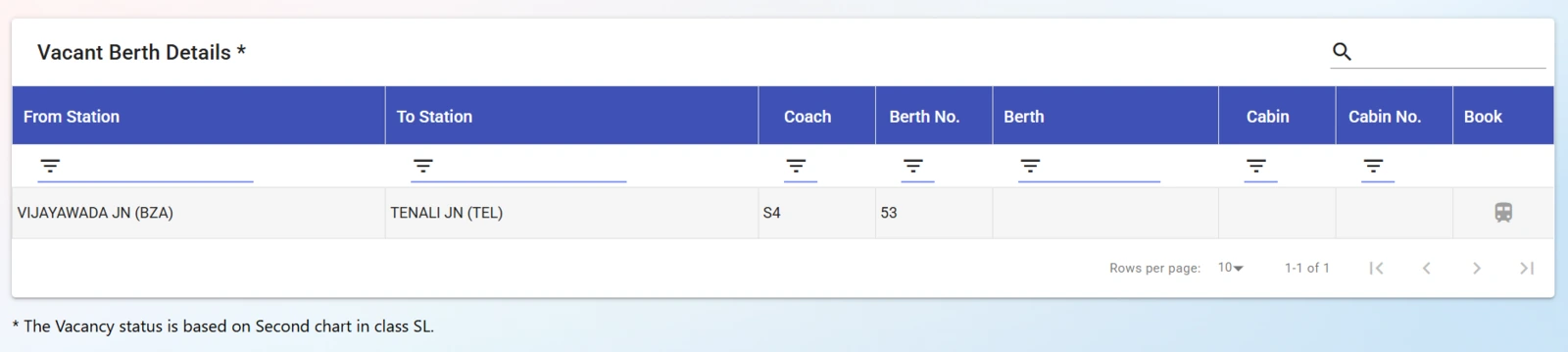
Start with From Station and To Station. These columns tell you where the vacancy begins and ends. Then look at Coach and Berth No. to identify the berth.
Example: For train 12760, the Sleeper chart shows coach S4, berth 53 vacant from Vijayawada Junction (BZA) to Tenali Junction (TEL). If you’re travelling beyond Tenali, this row doesn’t show an available berth for your full journey.
Why is a berth vacant on the chart but not bookable?
The chart shows what was vacant for a particular route segment at the time displayed. For an online booking, you still need availability for your route and an open booking window. IRCTC’s Current Booking rules allow confirmed e-tickets against vacant accommodation after charting, within the time limit set by Railways.
If the chart displays “Online booking is not available”, you can’t book online from that result. Check IRCTC train search for current availability on your exact route and date. If no ticket is offered, don’t treat the chart entry as a reservation.
What to check if the chart or vacancy list is empty
- No chart yet: Verify the train number, journey date and boarding station. If the chart for your selection hasn’t been prepared, check again later.
- Chart opens but no berths are listed: Check the selected class and clear any filters. An empty list for one class doesn’t tell you whether another class has vacancies.
- Vacancy ends before your stop: Check the To Station column before relying on that row. Look for availability that covers your full trip.
Frequently asked questions
When is the train reservation chart prepared?
Check First Chart Creation on the results page for your selected journey. Indian Railways’ March 2026 update described advance charting around 9 to 18 hours before departure. When a second chart is available, the vacancy page identifies it and shows its own timestamp. Use the time shown for your train instead of relying on a fixed countdown.
Is the IRCTC Reservation Chart the same as PNR status?
The reservation chart helps you find vacant berths for a train and route segment. PNR status tells you whether your existing ticket is confirmed, RAC or waitlisted.
Can I check vacant berths without a ticket?
Yes. The public chart only asks for the train, journey date and boarding station. To reserve a berth, check availability and complete the IRCTC ticket booking process.