
Quick answer: To change your IRCTC boarding point, open My Account → My Transactions → Booked Ticket History, select the ticket and choose Change Boarding Point. Since 1 April 2026, Confirmed and RAC tickets can be changed until the final chart, about 30 minutes before the train leaves its origin.
IRCTC boarding point change time limit
From 1 April 2026, passengers can change their boarding point up to preparation of the second/final reservation chart. Western Railway’s ARN 50 of 2026 records the extension and cites Railway Board letter 2026/TG-I/20/11 dated 23 March 2026.
The Western Railway notification, available as an archived copy, sets chart preparation as the cutoff. The Ministry of Railways announcement describes the digital window as up to 30 minutes before departure from the train’s origin station.
IRCTC’s older help page still mentions 24 hours; that deadline predates the April 2026 extension. Submit the request before the final chart rather than waiting until the last minute.
Example: A train starts at 6:00 PM and reaches your boarding station at 10:00 PM. Count the approximate 30-minute window back from the origin departure: 5:30 PM, not 9:30 PM. The actual cutoff is preparation of the second chart. Our IRCTC reservation chart guide explains chart checking.
Who can change the boarding point?
The revised facility covers Confirmed and RAC tickets. Waitlisted tickets are not eligible. See the eligibility details reported from Southern Railway’s April 2026 update. Check your current IRCTC PNR status before requesting the change.
A boarding-point change updates where you join the train. It does not change your train, destination or journey date. Choose an eligible en-route station from the list shown for your booking.
How to change the boarding station on the IRCTC website
Start at the official IRCTC website. The instructions below show the classic website. If the layout differs, look for your booked-ticket history and the boarding-point action. For access problems, use our IRCTC login guide.
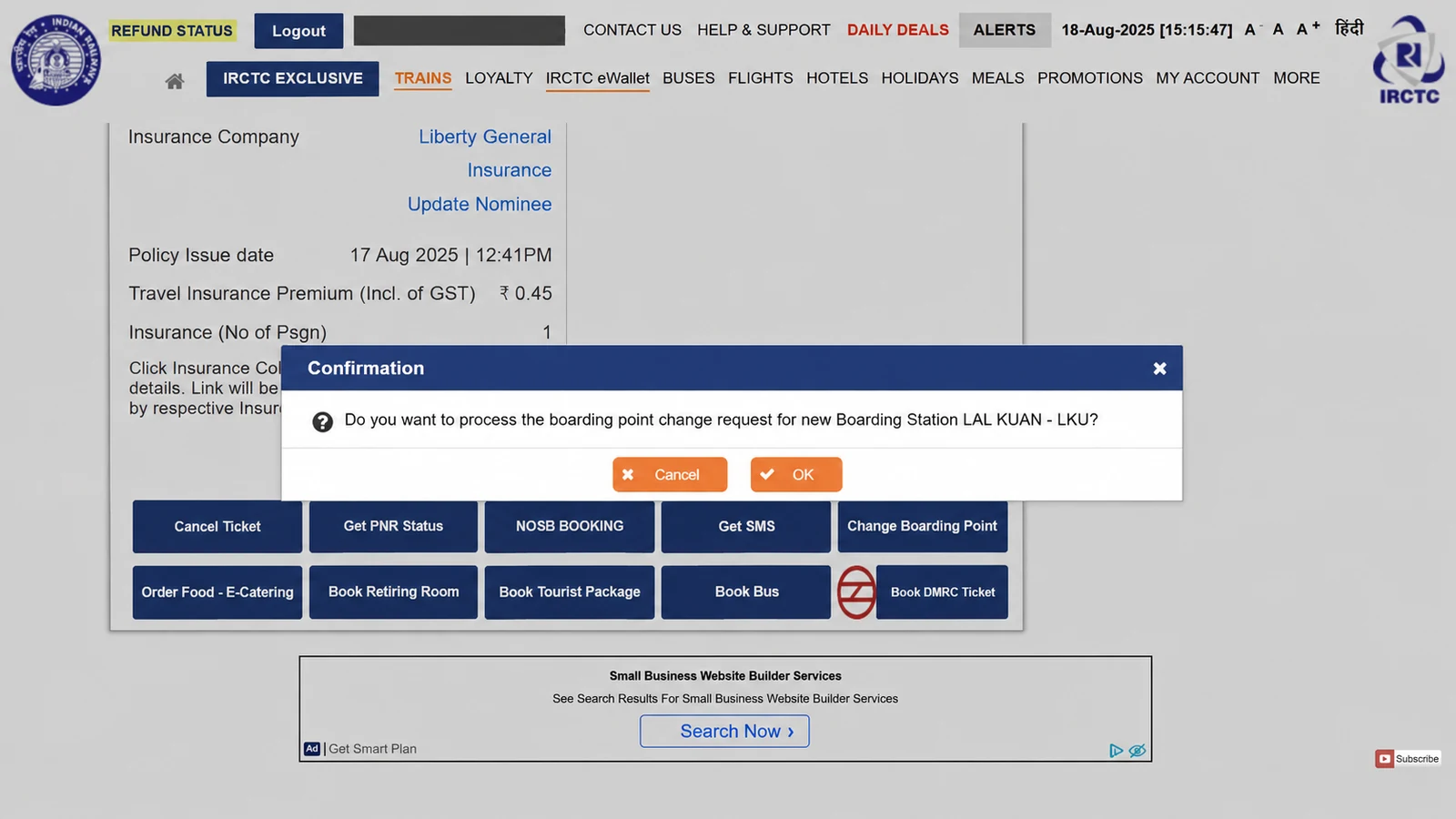
Illustrations of the classic IRCTC website; personal details hidden. These edited examples show the August 2025 interface.
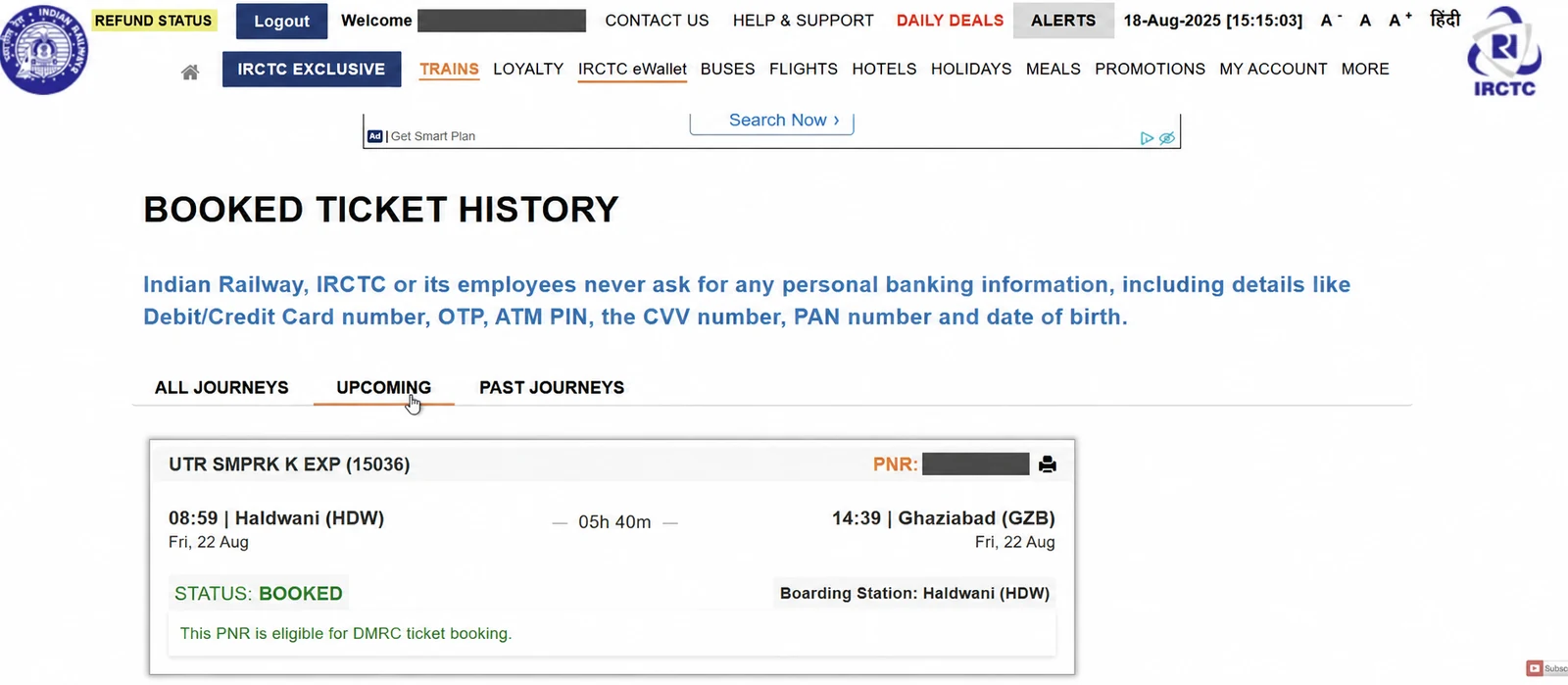
1. Find the correct booking
Open My Account → My Transactions → Booked Ticket History. Find the journey and check its PNR, train number and travel date. The example shows Haldwani as the existing boarding station.
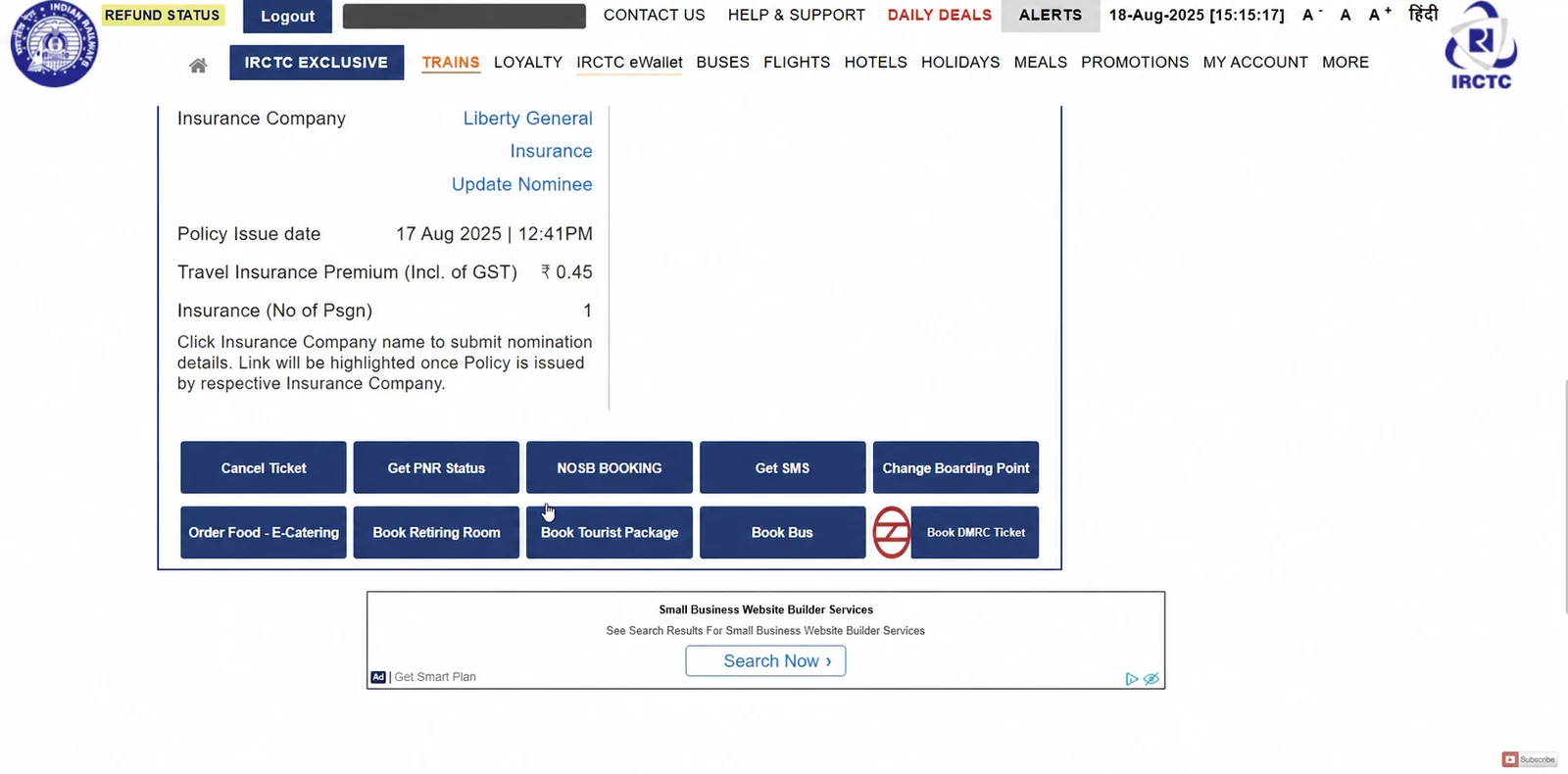
2. Open Change Boarding Point
Expand the booking and scroll to the action buttons. Select Change Boarding Point. Take care to choose this action rather than the nearby cancellation button.
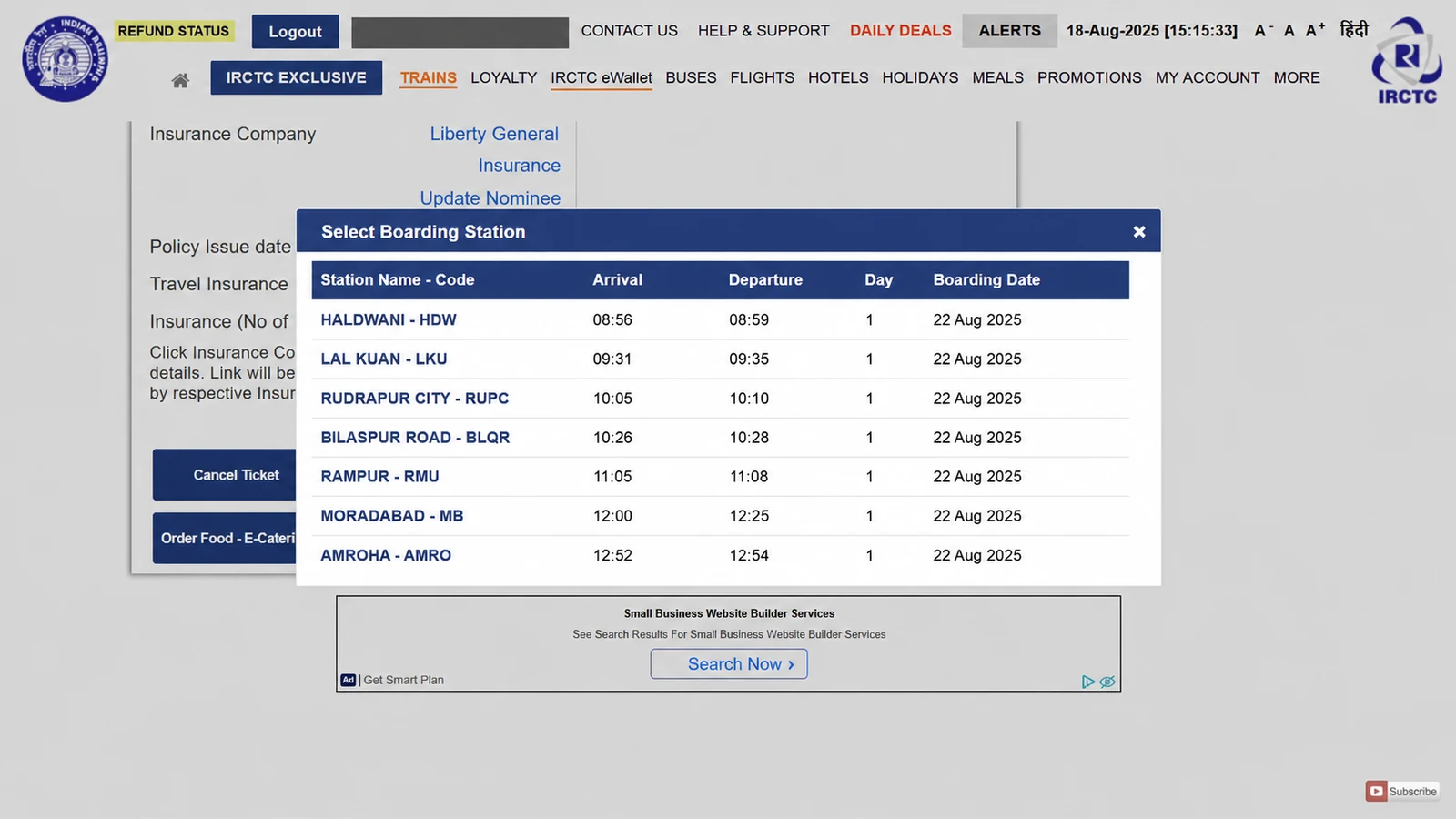
3. Choose the new station
Select the required station from the list IRCTC offers. Read its station code, departure time and boarding date. In this example, Lal Kuan appears as LAL KUAN – LKU. On an overnight journey, check the date carefully: a later station may fall on the next calendar day.
4. Confirm, then verify the saved change
The confirmation popup names the new station. Choose OK only when it is correct; choose Cancel to stop that request. Then reopen the booking and check the saved boarding station. Keep the updated reservation slip or confirmation for your journey.
How to change the boarding point in the IRCTC app
In IRCTC Rail Connect, open your booked ticket and its ticket-details screen. Tap the three-dot menu → Change Boarding Point. Choose the new station, confirm and reopen the ticket to check the update. The official app user guide shows this menu option.
Boarding point change rules you should know
You can change the boarding point once after booking. Choosing a different boarding station during the original booking does not use up that subsequent change. In that case, you can change it once more through Booked Ticket History, as stated in the official IRCTC boarding-point guidelines.
For a new ticket, check the boarding station before payment. Our IRCTC ticket booking guide covers the booking process.
After changing your boarding point, you lose the right to board from the original station. Under point 2 of the IRCTC guidelines, travelling without proper authority between the original and changed boarding stations attracts fare plus a penalty. Plan to board at the newly recorded station.
IRCTC’s guidelines also list restrictions for current-booking tickets, PNRs with VIKALP, seized tickets and online changes to I-Tickets. For a group booking, check which passengers the request covers before confirming.
Will you get a refund for the unused distance?
No. Changing your boarding point does not give you a refund for the initial portion you choose not to travel. Commercial Circular 17/2019, paragraph 637(iv), makes this a condition of the change.
For example, if your ticket covers Station A to Station D but you change boarding to Station B, you cannot claim the A-to-B fare back simply because you board later.
The Railway Board circular, available as an archived copy, also restricts ordinary refunds when the boarding point changes within 24 hours of departure. Exceptional cases, including train cancellation, coach non-attachment or a delay exceeding three hours, follow the applicable refund rules.
If you will not travel at all, check our IRCTC ticket cancellation and refund guide. Changing the boarding station does not cancel the ticket.
How to change the boarding point for a counter ticket
For a PRS counter ticket, use the official Counter Ticket Cancellation/Boarding Point Change service. A valid mobile number must have been supplied when booking, because the service sends an OTP to that number. The portal permits boarding-point changes till charting.
- Select Boarding Point Change as the transaction type.
- Enter the PNR, train number and captcha, then accept the procedure and rules.
- Submit and verify the OTP sent to the mobile number supplied at booking.
- Check the PNR details, select the new boarding station and submit.
- Verify the new boarding point in the displayed booking details.
If you cannot receive the OTP, contact a railway reservation counter promptly. The portal also directs passengers with NOSB bookings to a railway counter for this change.
Why is Change Boarding Point missing?
Check the ticket’s current status, the final-chart deadline and whether you have already used the permitted change. Also review any VIKALP or current-booking restriction. Make sure you opened the ticket in the account that booked it.
If IRCTC gives an error, note its wording and reopen the booking before retrying. This helps you check whether the first request succeeded. For an unresolved problem, contact official IRCTC support with the PNR and error details privately.
Frequently asked questions
Yes, after the first chart, provided you complete the request before preparation of the second/final chart and your ticket is eligible.
No. The revised facility covers Confirmed and RAC tickets; waitlisted tickets are not eligible.
Once after booking. If you selected a different boarding station during booking, you can still change it once more through Booked Ticket History.
Tatkal quota alone is not a separate prohibition in the published boarding-point guidelines. For an eligible Confirmed or RAC Tatkal booking, use the same process within the deadline and follow any conditions shown.
No. Boarding later does not entitle you to a refund for the unused initial portion of the booked journey.
Use departure from the train’s origin as the reference, not its later arrival at your boarding station. Complete the request before the second/final chart.
Yes. Open the booked ticket, tap the three-dot menu in ticket details and choose Change Boarding Point. Confirm and verify the saved update.
No. After changing the boarding point, you lose the right to board from the original station. Travelling without proper authority between the original and changed boarding stations attracts fare plus a penalty under IRCTC’s guidelines.
No. The popup asks you to approve the request. Reopen the booking afterwards and check that the new boarding station appears.
Yes, through the official counter-ticket service until charting. You must be able to receive an OTP on the mobile number supplied when booking.