
IRCTC PNR status is the live booking position of your train ticket. Each reserved booking gets a 10-digit Passenger Name Record (PNR) number. Use it to check your ticket status: confirmed (CNF), RAC, or waitlisted (WL). Check it on the Indian Railways PNR portal, in RailOne or IRCTC Rail Connect, or by SMS or a call to 139.
IRCTC PNR status:
| Point | What you should know |
|---|---|
| What it shows | Your ticket status (CNF, RAC, or WL), plus coach and berth details when available |
| PNR length | 10 digits |
| Where to find it | Top left corner of a counter ticket; also in the IRCTC confirmation SMS or email, and in booked tickets |
| Official website (no login) | Indian Railways PNR Enquiry |
| Official apps | RailOne (Indian Railways / CRIS) and IRCTC Rail Connect |
| SMS or phone | 139 (a charge may apply) |
| Until when it can change | Current status can change until Railways prepares the final reservation chart |
How to check IRCTC PNR status on the official website
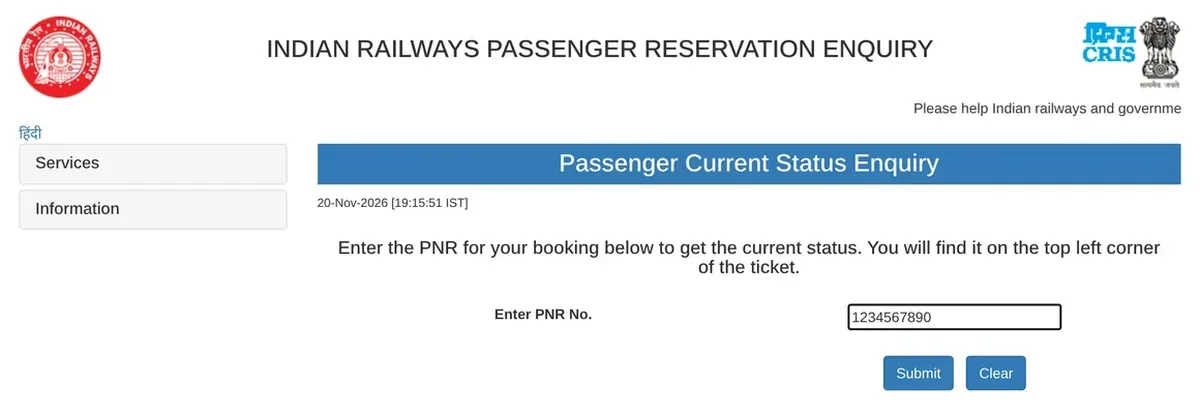
The official PNR enquiry page works without an IRCTC login.
- Open the official PNR enquiry page.
- Find the Enter PNR No. box and type your 10-digit PNR.
- Select Submit. If the page asks for a CAPTCHA or a simple answer, complete it, then submit.
- Read the current status for each passenger. For a confirmed reservation, the result usually shows the coach and berth after chart preparation.
- Check the charting status on the result. The official page notes that current status can still change before Railways prepares the final chart.
How to check PNR status on the IRCTC website or app
If you booked on IRCTC, you can also see the PNR and current status in that same account.
- Open the official IRCTC website or the IRCTC Rail Connect app.
- Sign in to the account you used to book that ticket.
- Open your booked tickets or ticket history.
- Select the journey and read the 10-digit PNR and the current reservation status.
Keep the Electronic Reservation Slip (ERS) or the IRCTC SMS handy. Use the PNR to check your reservation status or manage that booking.
How to check PNR status in the RailOne app
RailOne is the official Indian Railways app from CRIS. Government releases in 2026 list PNR enquiry among its services. See railone.indianrailways.gov.in.
- Download RailOne from the official Google Play Store or Apple App Store.
- Open the app and look for the PNR enquiry option.
- Enter your 10-digit PNR and view the current status.
Use RailOne or the official PNR website for booking status. Use the official NTES app for live train running, not as a PNR-check method.
How to check PNR status by SMS or a call to 139
139 is the Indian Railways enquiry and helpline number. Use it when your internet is poor. A charge may apply.
- Open a new SMS on a phone that can receive a reply.
- Type PNR, a space, and your 10-digit number. Example:
PNR 1234567890. Some Railway SMS lists have also usedIRPNRfollowed by the same number. - Send the message to 139.
- If you do not get a reply, dial 139 and follow the voice prompts to check PNR status.
IRCTC PNR status codes explained
The meanings below follow the legend on the official PNR enquiry page, which also lists less common codes such as RQWL (roadside quota waitlist) and DPWL (duty pass waitlist). A PNR identifies your booking. It does not guarantee a confirmed seat.
| Code | Meaning |
|---|---|
| CNF (Confirmed) | You have a confirmed reservation and can travel. The result usually shows coach and berth details after chart preparation. |
| RAC (Reservation Against Cancellation) | You can board with a shared seat. You may get a full berth later if one becomes available. |
| WL (Waitlist) | WL means waitlisted; the number shows your position. If all passengers on an e-ticket remain on the waiting list after chart preparation, IRCTC cancels it automatically. You cannot board with that ticket. Partly confirmed or RAC bookings are a separate case. |
| GNWL (General Waitlist) | General waitlist, usually linked to bookings from the train’s starting station. Whether it confirms depends on the train, date, class, and cancellations. |
| RLWL (Remote Location Waitlist) | Remote location waitlist, linked to mid-route or remote stations. The result depends on the train, date, class, and cancellations in that quota. |
| PQWL (Pooled Quota Waitlist) | Pooled quota waitlist, shared across a pool of smaller stations. The result depends on the train, date, class, and cancellations in that pool. |
| TQWL (Tatkal Waitlist) | Tatkal quota waitlist. The result depends on the train, date, class, and cancellations; there is no fixed confirmation ranking. |
| REGRET/WL | Railways accepts no more bookings in that quota. |
Booking Status vs Current Status
The official PNR enquiry result shows two separate columns: Booking Status (your position and quota at the time of booking) and Current Status (the latest position).
For example, Booking Status: GNWL 25 and Current Status: WL 8 means your waiting-list position has improved, but your ticket is still not confirmed.
Before Railways prepares the final chart, your current status may improve or worsen. The official portal also warns that predictions may differ from the actual result.
When does Indian Railways prepare reservation charts?
PNR status can move between WL, RAC, and CNF until Railways prepares the final chart. Indian Railways normally prepares two charts:
- First chart: Preferably by 20:00 the previous day for trains departing between 05:01 and 14:00, and preferably at least 10 hours before departure for trains leaving between 14:01 and 05:00.
- Final chart: Around 30 minutes before the scheduled departure.
These are normal timings, not a fixed countdown for every train. Check the First Chart Creation time on the IRCTC Reservation Chart, or the charting status on your PNR result. After the first chart, a confirmed ticket usually shows coach and berth numbers, but the current status can still change until the final chart. Check the latest coach and berth allocation before boarding.
If the result says Chart Prepared, Railways has prepared a reservation chart for that train. A confirmed ticket then usually shows the coach and berth. If all passengers on an e-ticket remain on the waiting list after chart preparation, Railways drops their names from the chart. They cannot board with that ticket. A partly confirmed or partly RAC booking is a separate case, and waitlisted names on that PNR may still appear on the chart.
Refunds if your ticket is waitlisted or RAC
Refund rules depend on the ticket type and on whether the whole PNR remains waitlisted. For steps, charges, and TDR cases, see how to cancel an IRCTC e-ticket and check your refund.
- E-ticket, all passengers still waitlisted after chart preparation: IRCTC cancels the ticket automatically and credits a refund to the original payment method after deducting applicable clerkage. Do not assume you will get the full amount you paid.
- Mixed PNR (some passengers confirmed or RAC, others waitlisted): Do not assume the whole booking will cancel automatically.
- RAC e-ticket: This does not cancel automatically. If you are not travelling, cancel it online before chart preparation. After chart preparation, file an online TDR within the applicable deadline, usually up to 30 minutes before scheduled departure. To claim a refund, you must cancel the RAC e-ticket or file an online TDR within that deadline.
- Counter (paper) waitlisted tickets: You normally need to collect the refund at a reservation counter. See IRCTC Counter Ticket Cancellation.
- Confirmed Tatkal tickets: Ordinary voluntary cancellation does not qualify for a fare refund. A waitlisted Tatkal ticket, or a train disruption, can follow different rules.
If your refund history shows a refund but your account has not received it, follow IRCTC Refund Not Received.
Tips and common problems
- Use official sources only. Check status on the official enquiry website, RailOne, IRCTC Rail Connect, or 139. Avoid unknown sites that ask for your password, OTP, or payment details.
- Never share your OTP, IRCTC password, or UPI PIN with anyone who claims they can confirm your ticket.
- Check more than once. The status can change until the final chart, so look again after the first chart and after the final chart.
- If all passengers on an e-ticket remain on the waiting list after chart preparation, IRCTC cancels it automatically. You cannot board with that ticket. Do not assume the same for a mixed confirmed, RAC, and waitlist PNR.
- Enter all 10 digits, with no spaces. If the site rejects the number, recheck the ticket or SMS. If the site is slow or asks for a CAPTCHA, try again, or use 139 or an official app.
FAQs on IRCTC PNR status
Q1. What is IRCTC PNR status and how do I check it?
It is the live booking position of your train ticket (confirmed, RAC, or waitlisted). Check it on the official PNR enquiry portal, by SMS or a call to 139, or in RailOne or IRCTC Rail Connect.
Q2. Where can I find my PNR number?
It is a 10-digit number. On a counter ticket it is generally at the top left corner. For e-tickets, see the IRCTC confirmation email or SMS, or your booked tickets.
Q3. Can I check PNR status without logging in?
Yes. The official PNR enquiry website and SMS or a call to 139 work without an IRCTC login.
Q4. What do CNF, RAC, and WL mean?
CNF means confirmed. RAC means you can board with a shared seat, which may later become a berth. If all passengers on an e-ticket remain on the waiting list after chart preparation, you cannot board with that e-ticket. Partly confirmed or RAC bookings follow different rules.
Q5. What is GNWL vs RLWL vs PQWL vs TQWL?
These are waitlist types for different quotas: GNWL is the general waitlist, usually from the train’s starting station; RLWL is a remote-location waitlist; PQWL is a pooled-quota waitlist; and TQWL is the Tatkal waitlist. Whether a ticket confirms depends on the train, date, class, and cancellations. There is no fixed ranking, and official predictions are indicative only.
Q6. When will the final chart appear?
Railways usually prepares the final chart around 30 minutes before scheduled departure. The first chart is earlier: preferably by 20:00 the previous day for departures between 05:01 and 14:00, and preferably at least 10 hours before for trains leaving between 14:01 and 05:00. Check the First Chart Creation time, or the charting status on your PNR result.
Q7. How do I check PNR by SMS?
Send an SMS to 139 with PNR followed by your 10-digit number, for example PNR 1234567890. Some Railway lists have also used IRPNR followed by the same number. If you do not get a reply, call 139. A charge may apply.
Q8. What does Chart Prepared mean?
Railways has prepared a reservation chart for that train. A confirmed ticket then usually shows the coach and berth. Check the latest allocation before boarding, as details can still change until the final chart. If everyone on an e-ticket remains on the waiting list after chart preparation, Railways drops their names from the chart. They cannot board with that ticket.