
Quick answer: If your IRCTC refund has not arrived, open My Account → My Transactions → Ticket Refund History. If it says Refunded but you can’t find the credit, check the original payment account and ask your bank or payment provider to trace the refund. If IRCTC still shows it as pending, or you can’t find a refund entry for an eligible cancellation, follow up through IRCTC eQuery. And If you were charged but no ticket was issued, check Failed Transaction History instead.
Where to check your IRCTC refund status
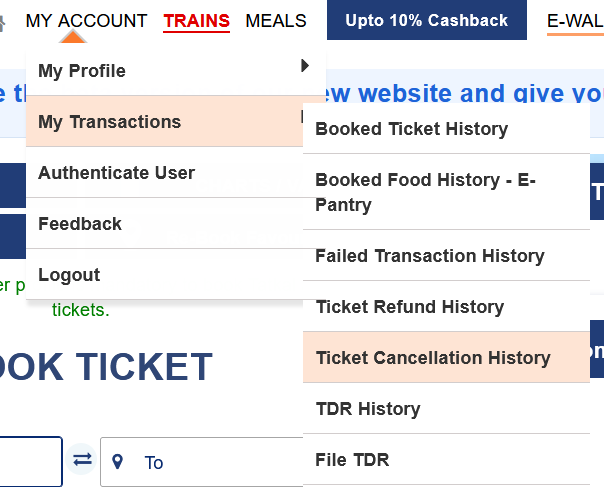
Sign in to the IRCTC website with the account used to book the ticket. On the classic site, go to My Account → My Transactions → Ticket Refund History and open the matching entry. Note the refund status, amount, date and any Bank Reference No. shown. Ticket Cancellation History helps you verify that the booking was cancelled; it doesn’t show whether the money reached your account.
IRCTC says Refunded but the money hasn’t arrived
- Check the original payment account. Look for the refund in the bank statement, card statement or wallet used to pay. Search by the refund amount and date; the amount can be lower than the original charge if cancellation deductions apply.
- Ask the bank or payment provider to trace the refund. Give them the Bank Reference No., if shown, along with the refund amount and date. The IRCTC booking transaction ID identifies the booking; it may not be the reference your bank needs for the credit.
- Go back to IRCTC if the reference is missing or the bank can’t trace it. Raise an eQuery, include the booking details, and ask IRCTC to confirm where the refund was sent and provide its reference.
For a booking paid through a travel app or agent, start with the provider that took your payment and ask for its refund status or payment reference.
Refund is pending or missing from Ticket Refund History
Open Ticket Cancellation History and make sure the right booking or passenger was cancelled. Check whether a refund amount is shown before assuming the whole fare is due. If the refund remains unresolved, open eQuery with your PNR, transaction ID, cancellation date and any refund details you can see. If you already filed a Ticket Deposit Receipt (TDR), check TDR History and use your existing claim details when following up.
Money was debited but no ticket was booked
Check Booked Ticket History before paying again. If IRCTC didn’t issue a ticket, look up the payment under My Account → My Transactions → Failed Transaction History. Keep your transaction ID, payment date, amount and payment reference. In eQuery, choose Refund → Payment Deducted Ticket not booked. If the transaction shows that IRCTC did not receive the payment, ask your bank or payment provider to trace the original debit. IRCTC explains the difference between settled and unsettled payments in its failed booking guidance.
How to raise an IRCTC refund complaint in eQuery
Open the official IRCTC eQuery portal. Choose E-Query → Refund, then select the sub-category that matches your issue. If prompted to sign in, use your registered email address or mobile number and complete the on-screen verification.
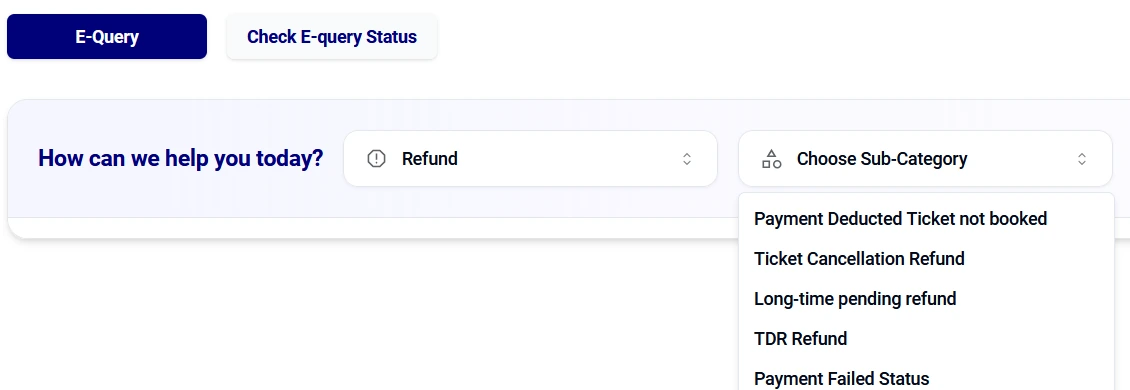
| Your situation | eQuery sub-category to look for |
|---|---|
| Ticket cancelled but refund unresolved | Ticket Cancellation Refund |
| An existing refund has remained pending | Long-time pending refund |
| Payment deducted and no ticket issued | Payment Deducted Ticket not booked |
| Following up on a TDR you already filed | TDR Refund |
Submit the details requested. Keep the Concern ID if the portal shows one, and use Check E-query Status to view your complaint or IRCTC’s response. That tab tracks your complaint; Ticket Refund History tracks the refund itself. If you need help by phone, IRCTC lists 14646 for calls within India on its official contact page.
Example complaint: “I cancelled my ticket on [date]. The refund status is [status], but I can’t find the credit in my original payment account. PNR: [PNR]. Transaction ID: [ID]. Refund amount and date shown: [details]. Please confirm the refund status and provide the bank reference if the refund has been sent.”
Share booking and payment references only through official support channels. You don’t need to share your password, OTP, card PIN or UPI PIN to receive a refund.
Frequently asked questions
How long should I wait for an IRCTC refund?
There isn’t one reliable timeline for every refund. Check the status, refund date and original payment statement. If a refund is marked as sent, use its reference to trace it. For a pending or missing refund, follow the case through IRCTC. The IRCTC refund rules explain why payment processing times can vary.
Is a lower refund amount the same as a missing refund?
Compare the credit with the refund amount shown, not just the original fare. If the bank credit matches the amount shown, check the cancellation deductions. If the credit is below the amount IRCTC says it sent, include both amounts in your follow-up.