
Quick answer: IRCTC Tatkal booking opens at 10 AM IST for AC classes and 11 AM IST for non-AC classes, one day before the train leaves its originating station. Sign in with an Aadhaar-authenticated account, select Tatkal quota, choose the train and class, enter passenger details, complete any OTP requested, and pay.
How to book a Tatkal ticket on the IRCTC website
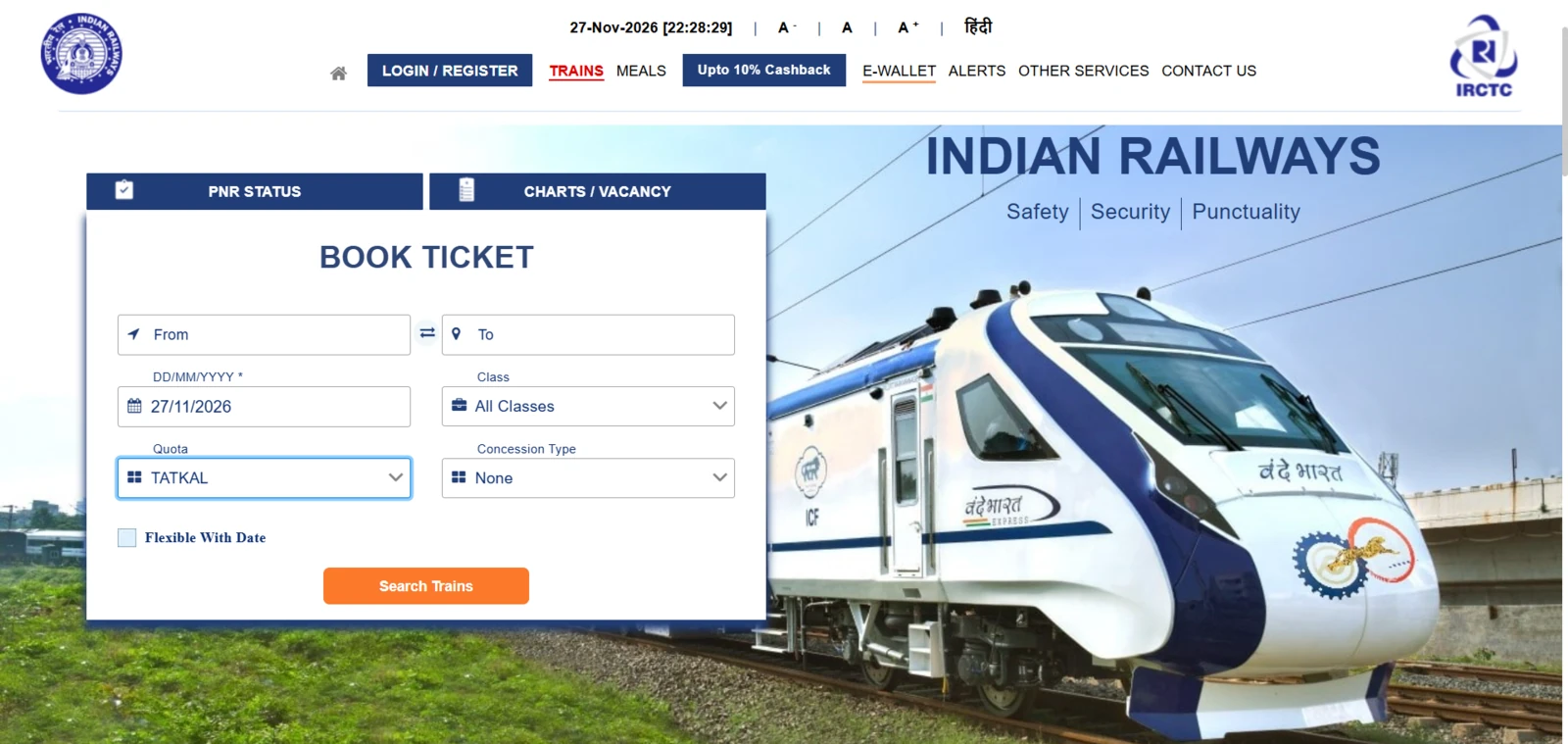
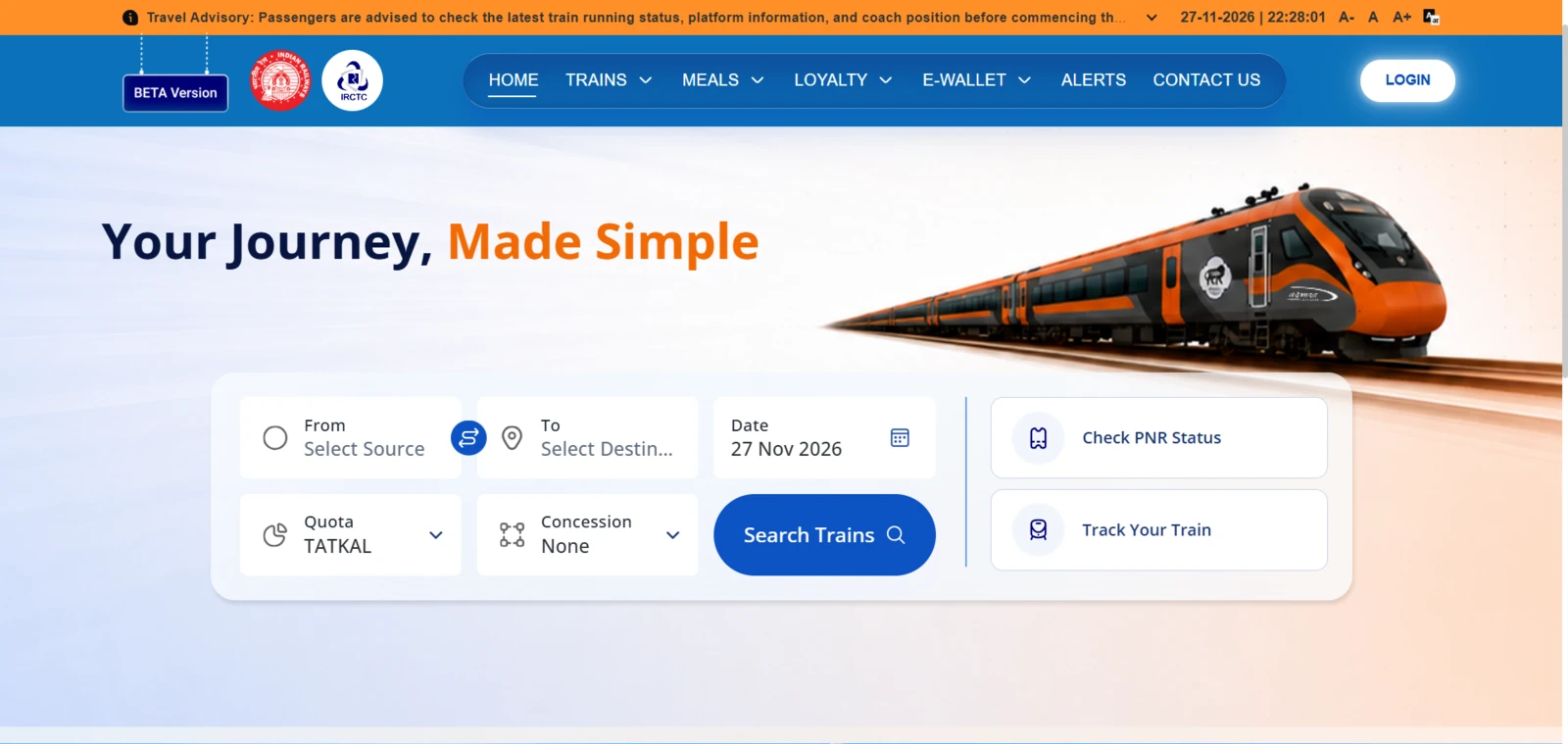
Open the official IRCTC website and sign in before the relevant opening time. The screenshots below show the classic and beta layouts. Check that the quota says Tatkal before continuing.
1. Enter your journey details and select Tatkal
Select From, To and the date you will board. Choose TATKAL in the quota field, then select Search Trains. On the classic form, you can also select a class. If the train reaches your station a day after leaving its origin, check the opening-date example below.
2. Check the train, class, availability and fare
Select your class and refresh availability if needed. Check the train number, route, departure date and quota. The classic results use Book Now; the beta results use Book. Availability and fares in these screenshots are examples from the time of capture.
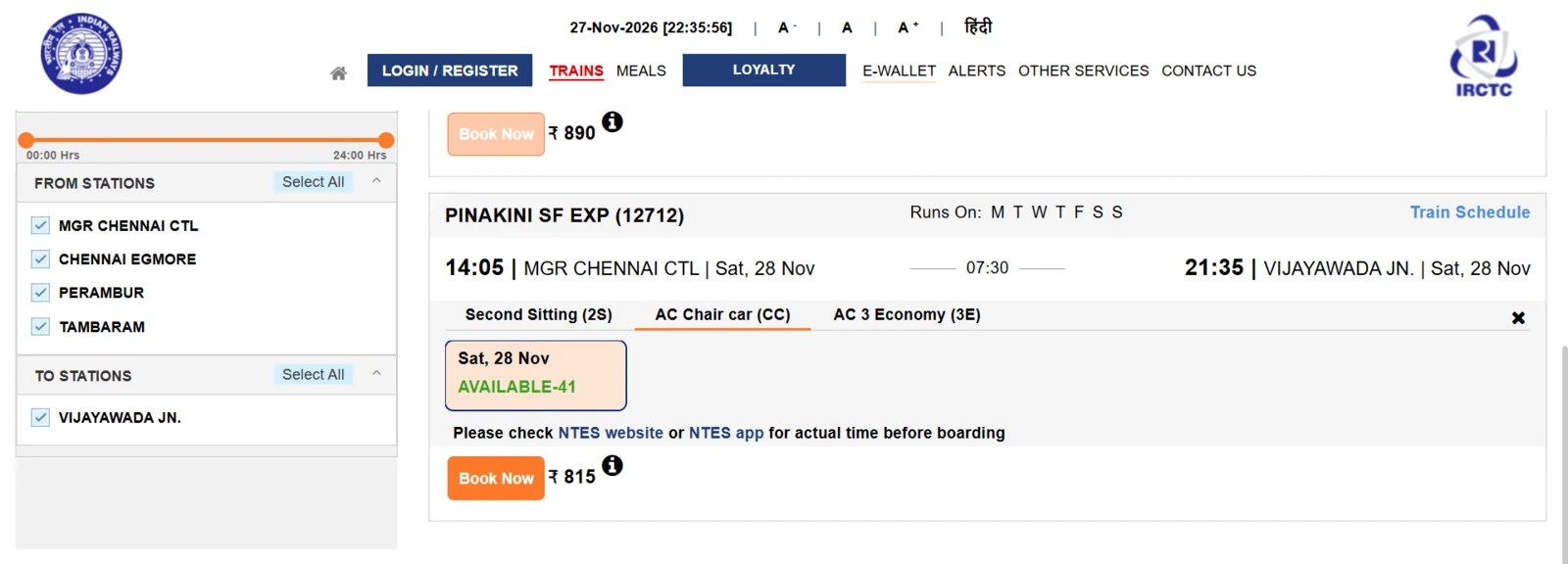
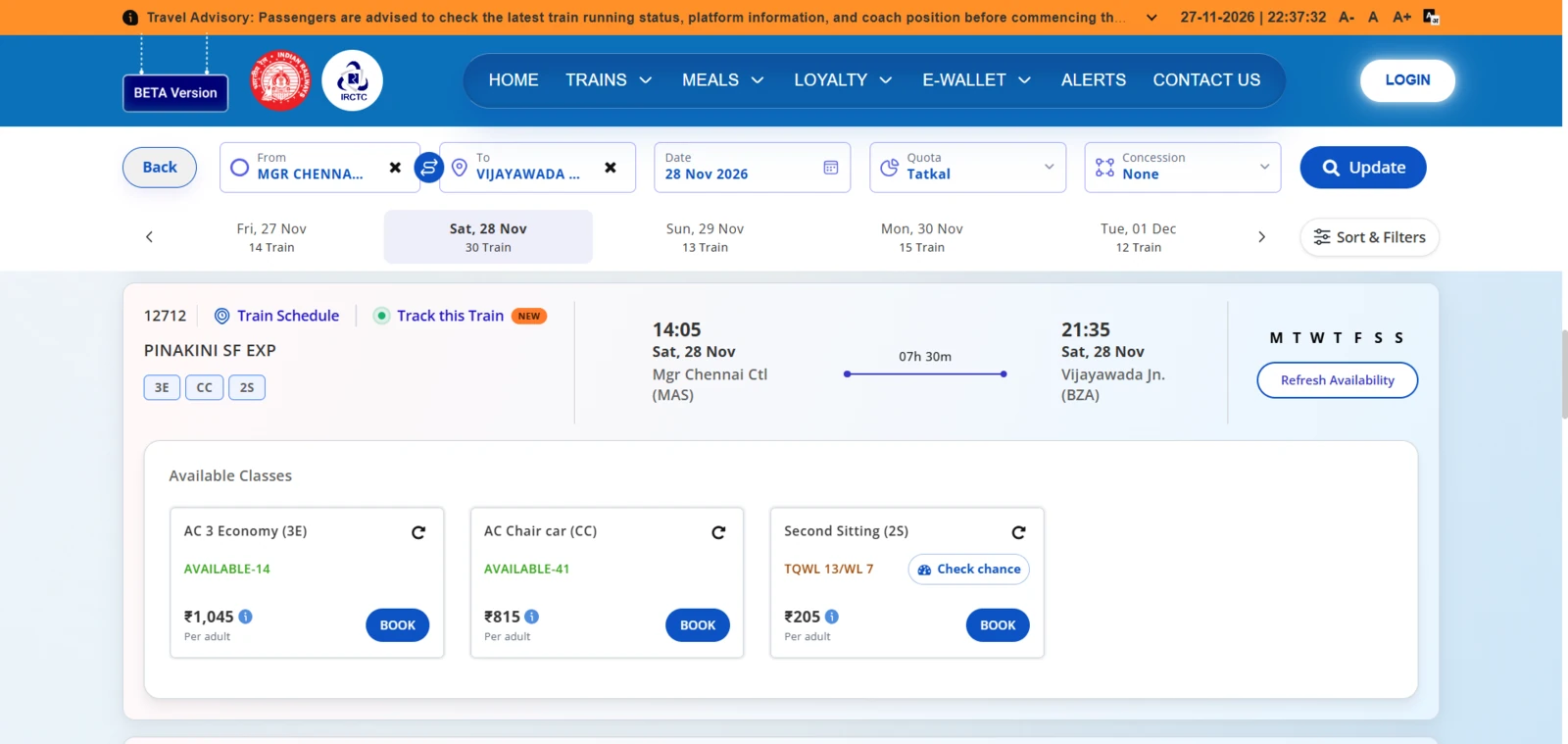
Read the status: AVAILABLE is the position shown when checked. TQWL means Tatkal Quota Waitlist. A Book button does not promise a confirmed berth. In the beta example, the fare is per adult; review the total for all passengers later.
3. Add passengers and check the boarding station
Enter each passenger’s name as on their ID, age, gender and berth preference, or select accurate saved passengers from the Master List. Tatkal permits a maximum of four passengers per PNR. Check the boarding station and contact number. A berth preference is a request, not an assured allocation.
4. Review, complete verification and pay
Review the train, date, class, quota, passenger names and final amount. Complete the captcha or OTP if the screen requests one. Choose an available payment method and finish the payment instructions.
5. Check the issued ticket and PNR
After booking, save the e-ticket and check its current status with our IRCTC PNR status guide. If money leaves your account but no ticket appears, check Booked Ticket History and Failed Transaction History before paying again. Our IRCTC ticket booking guide covers the wider booking and payment process.
How to book Tatkal in the IRCTC Rail Connect app
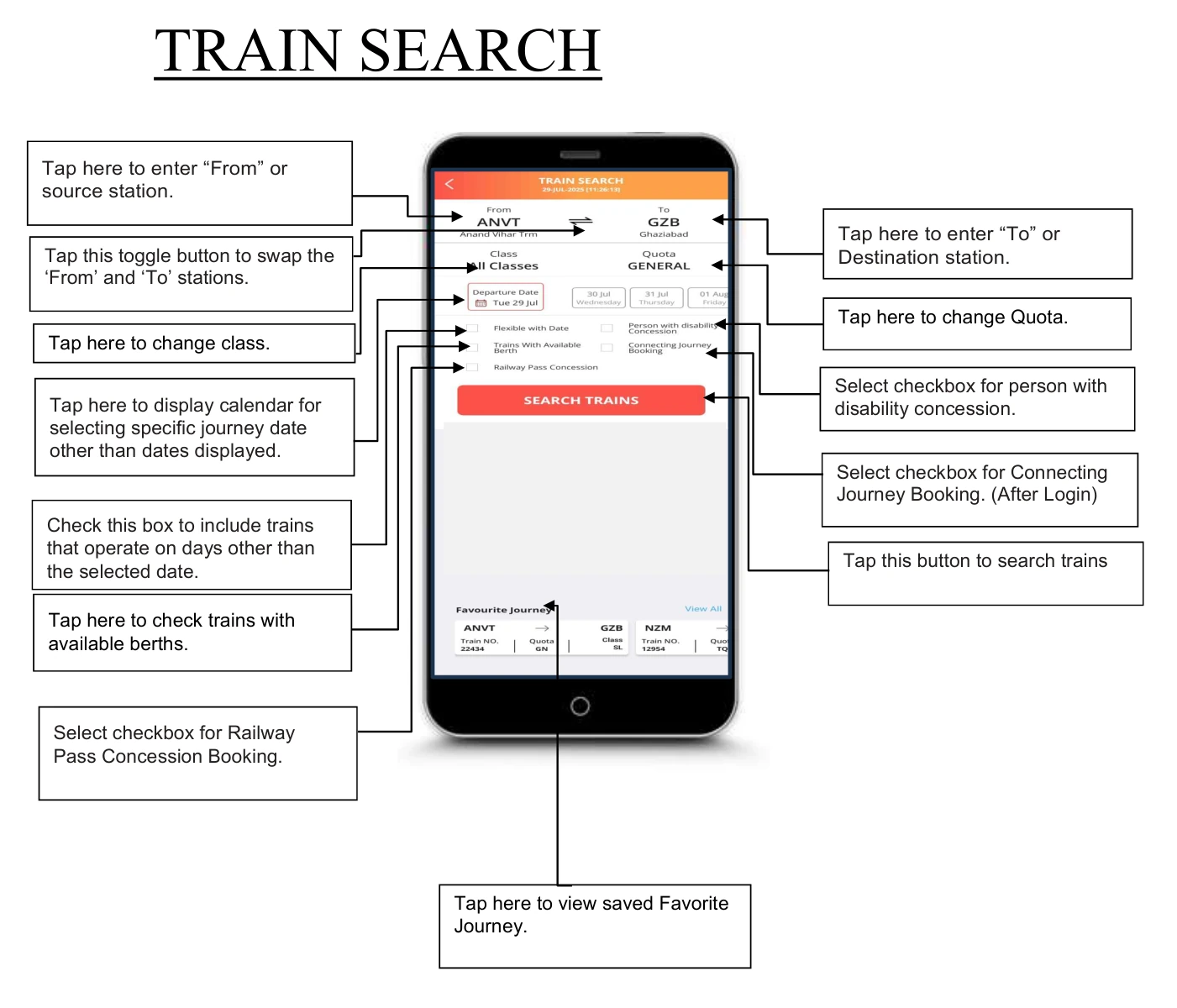
Sign in to IRCTC Rail Connect with your Aadhaar-authenticated account. The images below come from the official IRCTC app user guide and show General-quota examples of the booking controls. For this article’s process, choose Tatkal. Screen labels and payment options may vary by app version.
1. Search the journey and select Tatkal
Open Train → Book Ticket or the train-search screen. Enter From, To and the date you will board. Change Quota to Tatkal, search trains, then select the train and class after checking availability and fare.
2. Add passengers and review the boarding station
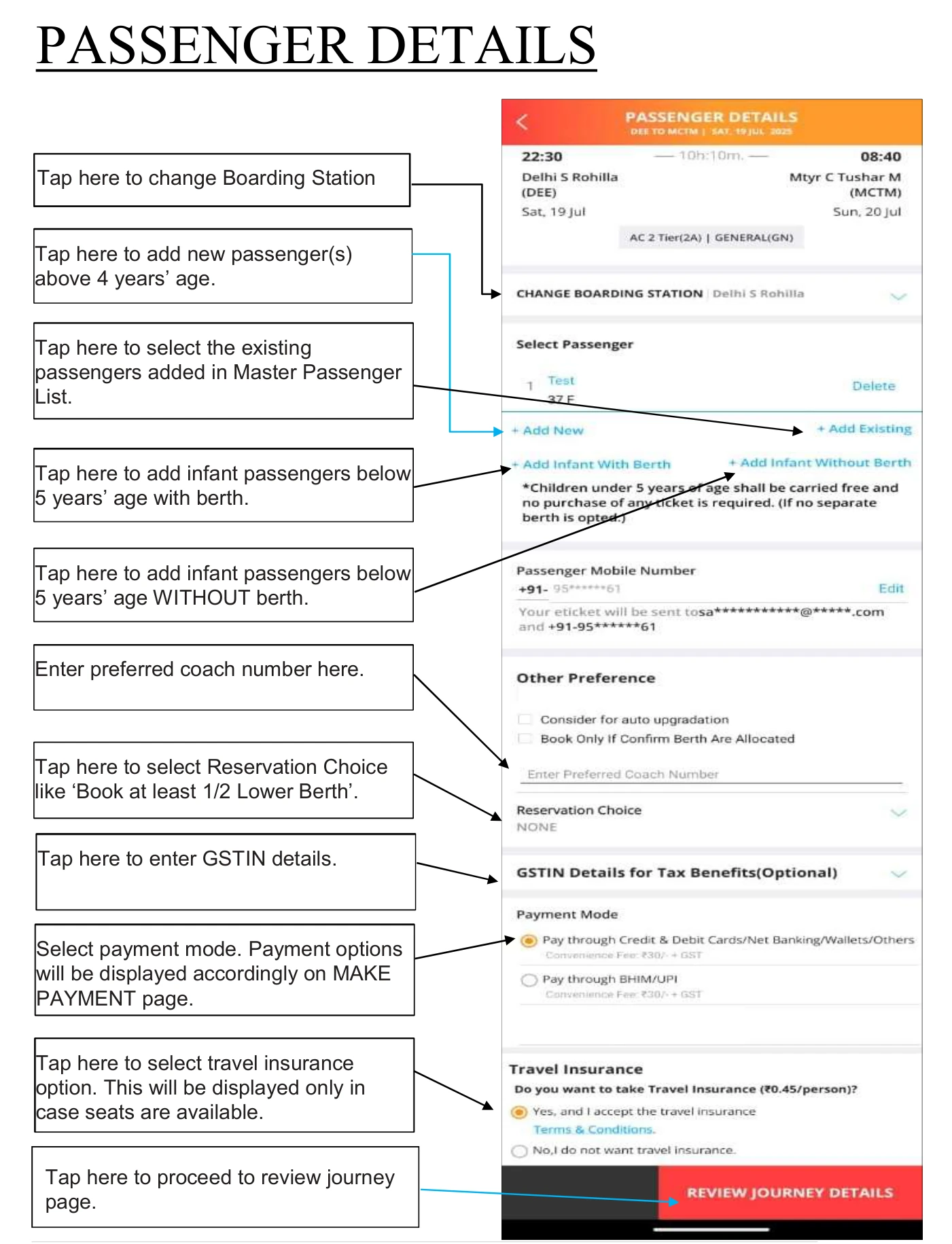
Use Add New to enter passengers or Add Existing to choose accurate Master List entries. Check their details, the boarding station and contact number. Keep within the Tatkal limit of four passengers per PNR, then proceed to Review Journey Details.
3. Complete verification, pay and check the ticket
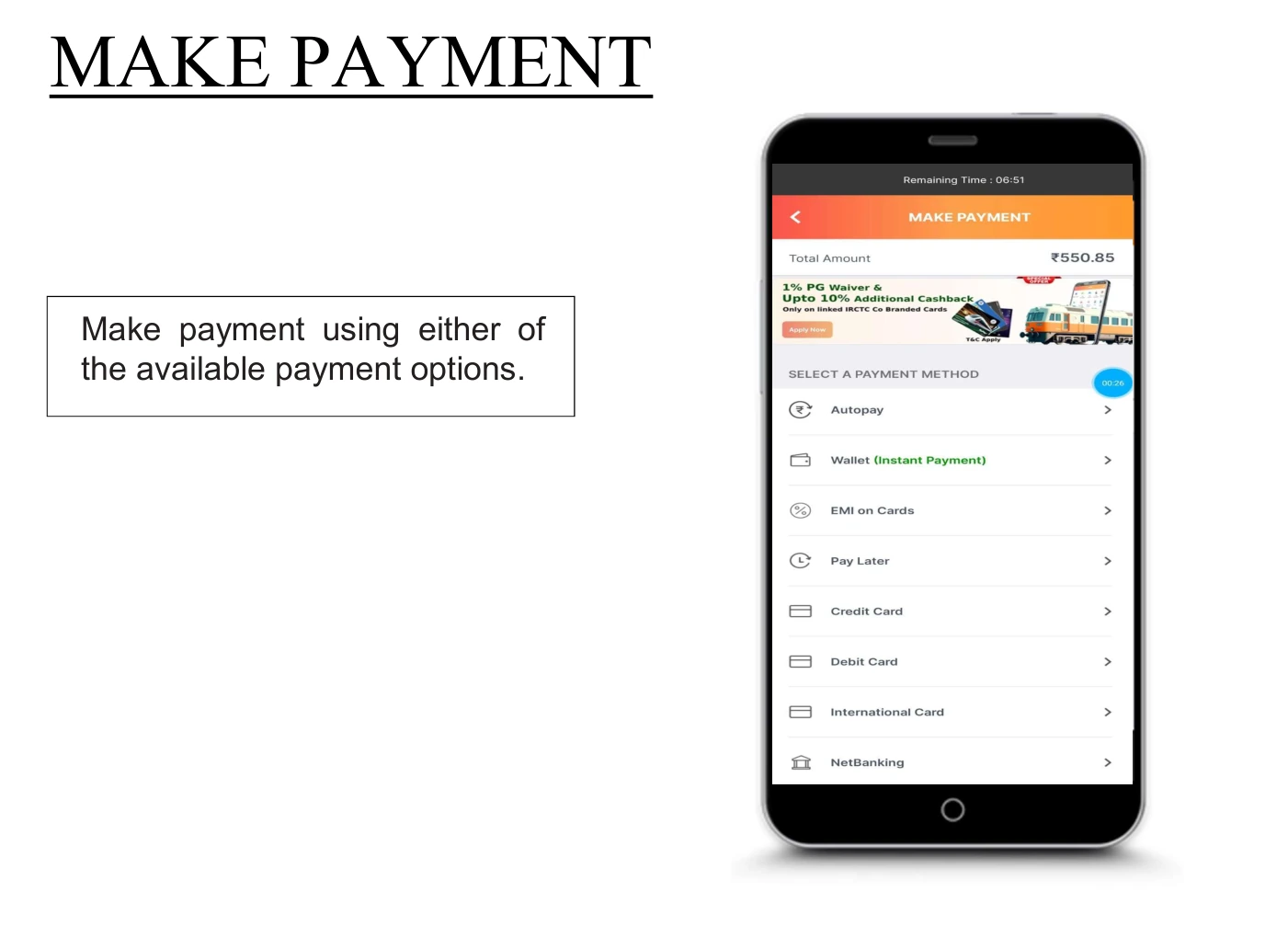
Review the train, boarding date, class, Tatkal quota, passenger details and total. Complete any verification requested. Select an available payment method and follow its approval steps. After booking, check the issued ticket and its status in My Bookings.
IRCTC Tatkal booking time: 10 AM or 11 AM?
Tatkal opens one day before the train’s departure date from its originating station, excluding that departure date. All opening times below are in Indian Standard Time (IST).
| Class group | Classes listed in IRCTC’s opening-time guidance | Opening time |
|---|---|---|
| AC | 2A, 3A, CC, EC, 3E | 10:00 AM IST |
| Non-AC | SL, FC, 2S | 11:00 AM IST |
Overnight example: A train leaves its first station on 28 November, and you board it at an intermediate station on 29 November. Tatkal opens on 27 November, at 10 AM for AC or 11 AM for non-AC. Enter your actual boarding date in the journey search.
Tatkal is available only for eligible trains, classes and station combinations. Check the quota offered for your journey. The official IRCTC Tatkal FAQ explains the origin-date calculation.
Aadhaar authentication, OTP and agent restrictions
Since 1 July 2025, online Tatkal booking through IRCTC’s website and app requires an Aadhaar-authenticated user account. Complete profile authentication before booking day. If you need an account or help authenticating it, use our IRCTC registration and Aadhaar guide.
Account authentication and booking-time OTP are separate. The Ministry’s July 2026 update says Aadhaar-based OTP verification during online Tatkal booking has been introduced on selected trains. If IRCTC asks for an OTP, enter it to continue. Keep access to the relevant mobile number.
Authorised agents cannot book opening-day Tatkal tickets during the first 30 minutes: 10:00–10:30 AM for AC and 11:00–11:30 AM for non-AC. The official Aadhaar and agent announcement specifies these restrictions.
From 15 July 2025, Tatkal bookings at computerised PRS counters and through authorised agents require an OTP sent to the mobile number given at the time of booking.
Tatkal charges: how much extra will you pay?
The Tatkal surcharge is 10% of basic fare for Second Sitting (2S) and 30% for other classes, subject to the applicable minimum and maximum. It is an extra charge per passenger, not the whole ticket price.
| Class | Minimum Tatkal surcharge | Maximum Tatkal surcharge | Minimum distance for charge (km) |
|---|---|---|---|
| Second Sitting (2S) | ₹10 | ₹15 | 100 |
| Sleeper (SL) | ₹100 | ₹200 | 500 |
| AC Chair Car (CC) | ₹125 | ₹225 | 250 |
| AC 3 Tier (3A) | ₹300 | ₹400 | 500 |
| AC 2 Tier (2A) | ₹400 | ₹500 | 500 |
| Executive (EC), where offered | ₹400 | ₹500 | 250 |
Illustration: If the applicable Sleeper basic fare is ₹400, 30% is ₹120. That falls within the ₹100–₹200 limits, so the Tatkal surcharge is ₹120. The final payable total also includes the other applicable fare components and charges.
Source: the current-charge table on the official Indian Railways Tatkal scheme page. Check the live fare breakup for 3E and any class not separately listed above.
Tatkal ticket rules: passengers, concessions and classes
- Passenger limit: A maximum of four passengers per PNR on a Tatkal e-ticket.
- Concessions: No concession, including senior-citizen concession, applies under Tatkal.
- Name changes: Change of passenger name is not permitted for Tatkal bookings. Check names before payment.
- First AC: Tatkal is not available in 1A.
- Executive Class: Do not assume EC is excluded everywhere. Check the actual train’s quota availability; official railway guidance includes EC in the opening-time and charge tables.
- Boarding later: Use the proper request process explained in our IRCTC boarding point change guide.
- Travel documents: Keep the e-ticket or reservation message, and a prescribed original photo ID for at least one passenger on the PNR, ready for the journey.
The official Tatkal booking guide, IRCTC terms and railway scheme page describe these conditions.
Tatkal cancellation, refund and TDR rules
Confirmed Tatkal tickets
Ordinary voluntary cancellation of a confirmed Tatkal ticket gives no fare refund. A fully confirmed PNR follows this rule even if it was originally waitlisted. The mixed-PNR exception below has separate conditions. Train disruption and other eligible exceptions follow separate refund rules.
Waitlisted and RAC tickets
For an unused ticket that remains RAC or waitlisted, cancel within the applicable deadline, up to 30 minutes before scheduled departure, for a refund after clerkage. Check the current status first.
If every passenger on an e-ticket remains waitlisted after charting, cancellation and the applicable refund are automatic. Do not assume automatic cancellation for a mixed-status PNR.
If some passengers are confirmed and others are waitlisted or RAC, a fare refund less clerkage is also allowed for the confirmed passengers, but only if you cancel the entire ticket, or file a TDR for all passengers, up to 30 minutes before scheduled departure. See the official partially confirmed e-ticket conditions.
When a TDR may be needed
If online cancellation has closed and IRCTC requires a Ticket Deposit Receipt (TDR) for an eligible claim, choose the correct reason and meet its deadline. For an unused RAC e-ticket, the published cancellation/TDR cutoff is 30 minutes before departure. A TDR does not guarantee approval.
For a qualifying delay exceeding three hours when you do not travel, the published TDR deadline is before actual departure. A fully cancelled train normally triggers the eligible e-ticket refund automatically. See the official refund and TDR rules and our IRCTC ticket cancellation guide.
Refund issued but not credited? Follow our IRCTC refund not received guide to check the original payment account, trace any bank reference and raise an eQuery request.
Tatkal vs Premium Tatkal: what is different?
Premium Tatkal (PT) is a separate quota with dynamic pricing. Its fare can rise as bookings progress; compare the final quote rather than applying the regular Tatkal surcharge table. The Ministry’s Premium Tatkal explanation describes this distinction.
An Aadhaar-authenticated account is required for online Premium Tatkal too, as the official IRCTC authentication guide confirms. Check PT availability and the fare shown for your train before paying.
Confirmed Premium Tatkal tickets also have no ordinary cancellation refund. Train cancellation and partially confirmed cases follow the published refund rules.
Common Tatkal booking mistakes and practical tips
- Wrong opening date: Check when the train starts at its origin, especially if you board after midnight.
- Wrong quota: Recheck Tatkal after changing the route, date or class.
- Account not ready: Complete Aadhaar authentication beforehand and sign in shortly before opening.
- Typing under pressure: Prepare accurate Master List entries in advance; recheck the passengers you select.
- Payment delays: Keep your chosen payment method and the phone needed for approval ready.
- Assuming success: A search result, fare or payment debit is not the issued ticket. Check the PNR and booking history.
- Unauthorised tools: Do not use unofficial Tatkal booking software or auto-booking extensions. Under the IRCTC terms on scripting tools and Tatkal software, misuse may lead to account deactivation and cancellation of tickets without a refund.
- Expecting a guaranteed berth: Availability can change before booking completes; berth preferences and prediction tools do not guarantee confirmation.
Frequently asked questions
AC Tatkal opens at 10 AM IST and non-AC Tatkal at 11 AM IST, one day before the train leaves its originating station.
Use the train’s origin departure date to calculate the Tatkal opening day. Enter the date you actually board when searching your journey.
Yes. Since 1 July 2025, you need an Aadhaar-authenticated IRCTC account to book Tatkal online through the website or app.
Do not assume the same flow for every train. The July 2026 Ministry update describes booking-time Aadhaar OTP on selected trains. Enter the OTP if IRCTC requests it.
A maximum of four passengers can be booked on a Tatkal e-ticket PNR.
No. The Tatkal surcharge is additional to normal fare and follows class-based minimum and maximum limits. Check the final total before payment.
Ordinary voluntary cancellation gives no fare refund. Eligible railway disruption cases follow separate rules.
If everyone remains waitlisted after charting, the e-ticket is cancelled automatically and the applicable refund follows after clerkage. If some passengers are confirmed and others are waitlisted or RAC, a fare refund less clerkage is also allowed for the confirmed passengers, but only if you cancel the entire ticket, or file a TDR for all passengers, up to 30 minutes before scheduled departure.