
Quick answer: To reset your IRCTC password, open the official IRCTC website and select Forgot account details? in the login form. Enter your IRCTC username or registered email address, then enter your registered mobile number in the separate field. Complete the CAPTCHA if shown and select Next. Follow the verification instructions to set a new password.
What you need to reset your IRCTC password
Keep your IRCTC username or registered email address and the mobile number linked to the account handy. The first box takes either a username or an email address; the mobile number goes in its own box. If IRCTC sends a verification code, you will also need access to the phone or inbox it lists.
How to reset your password on the classic IRCTC website
- Open the classic IRCTC site and select Login / Register.
- In the login form, select Forgot account details?.
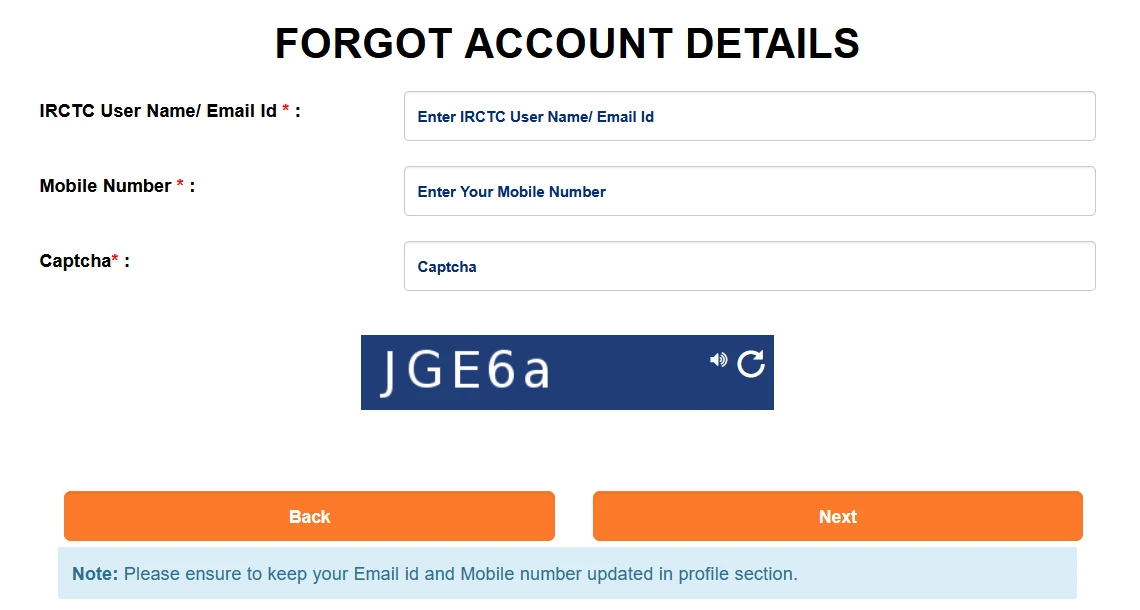
- Enter your username or registered email in the first box and your registered mobile number in the second. Type the CAPTCHA displayed in your browser, then select Next.
- Enter the OTP sent to your registered mobile number or email address. Set a new password, complete the CAPTCHA on the next screen, and select Update Password.
- After the reset succeeds, return to login and sign in with your IRCTC username and new password. If your browser fills in the old password, replace it before trying again.
How to reset your password on the IRCTC beta website
- Open the IRCTC beta site and select Login → User Login → Forgot account details?.
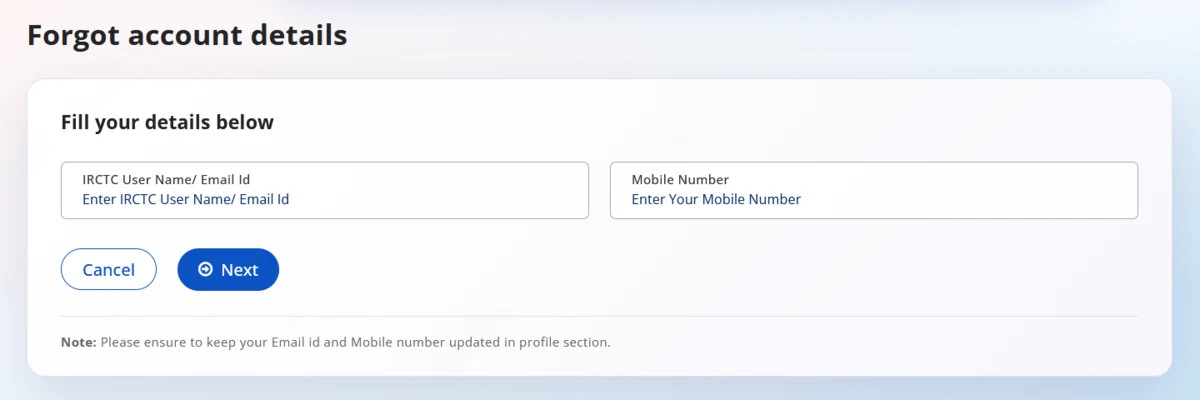
- Enter your username or registered email and your registered mobile number. The opening beta recovery screen shown below has no visible CAPTCHA field.
- Select Next and follow the verification and password reset prompts on the site. If the beta page does not open, start again from Forgot account details? on the classic site.
What if you forgot your IRCTC username too?
Use your registered email in the first recovery box and your registered mobile number in the second. You can also search your email for the original IRCTC registration message, which may contain your user ID. Once your password is reset, use your username to sign in. See our IRCTC website login guide if you need help getting back into your account.
What to do if the password reset does not work
- Details do not match: Check that the username or email and the mobile number belong to the same IRCTC account. If you usually use a different email address, check which one received your IRCTC registration message.
- CAPTCHA rejected: Use the latest characters shown on your screen and match uppercase and lowercase letters. If the form offers a refresh control, request a new CAPTCHA and try again.
- OTP not received: Check the destination shown on the verification screen. If the code is sent by email, check Spam or Junk. If it is sent by SMS, check that you can receive messages on the registered number. Use the resend option if IRCTC shows one.
- New password not accepted: Follow the password rules displayed on the form and make sure the new password and confirmation match.
- No access to the registered mobile number or email: If you cannot complete the verification shown, use IRCTC eQuery or the official IRCTC contact page. Do not share your password or OTP.
IRCTC Forgot Password FAQs
Can I reset my IRCTC password without knowing the old password?
Yes. Select Forgot account details? on the login screen and complete the account verification to set a new password.
Can I reset my password if I forgot my IRCTC username?
Use your registered email address in the first recovery field and your registered mobile number in the second. If you need your username to sign in afterward, check your original IRCTC registration email for the user ID.
Can I reset my IRCTC password with just my mobile number?
The website recovery form asks for your IRCTC username or registered email address in addition to your registered mobile number.
What if I no longer have access to my registered mobile number?
If you cannot complete the verification shown on the recovery screen, contact official IRCTC eQuery support for help with your account.